 CTableHeaderArea
The figure below illustrates the HeaderArea of the CTable:
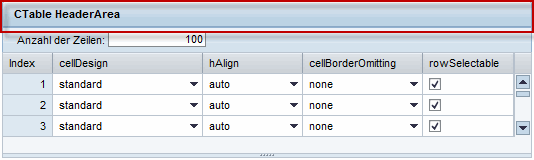
You can find the design options of the HeaderArea under HeaderArea Properties.
Runtime Class |
CL_WD_C_TABLE_HEADER_AREA |
Properties in View Designer
Name |
Type |
Initial Value |
Bindable |
|---|---|---|---|
STRING |
(automatic) |
No |
|
Translatable text |
Yes |
||
WDY_BOOLEAN |
true |
Yes |
|
WDUI_PANEL_HEADER_DESIGN |
light |
Yes |
|
STRING |
Yes |
||
Translatable text |
Yes |
||
WDY_BOOLEAN |
false |
Yes |
|
Translatable text |
Yes |
||
WDUI_VISIBILITY |
visible |
Yes |
Other properties that can be inherited are defined in the related higher-level classes. The related UI elements are:
Dynamic Programming
For dynamic programming, the same properties, events and aggregations are available as in the View Designer. Note the different spellings.
View Designer Name |
Runtime Name |
Type |
|---|---|---|
ACCESSIBILITY_DESCR |
WDY_MD_TRANSLATABLE_TEXT |
|
ENABLED |
WDY_BOOLEAN |
|
HEADER_DESIGN |
WDUI_PANEL_HEADER_DESIGN |
|
headerDesign: emphasized |
CL_WD_C_TABLE_HEADER_AREA=>E_HEADER_DESIGN-EMPHASIZED |
|
headerDesign: light |
CL_WD_C_TABLE_HEADER_AREA=>E_HEADER_DESIGN-LIGHT |
|
headerDesign: standard |
CL_WD_C_TABLE_HEADER_AREA=>E_HEADER_DESIGN-STANDARD |
|
headerDesign: transparent |
CL_WD_C_TABLE_HEADER_AREA=>E_HEADER_DESIGN-TRANSPARENT |
|
headerDesign: underline |
CL_WD_C_TABLE_HEADER_AREA=>E_HEADER_DESIGN-UNDERLINE |
|
IMAGE_SOURCE |
STRING |
|
TITLE |
WDY_MD_TRANSLATABLE_TEXT |
|