 Selection Criteria and Logical Databases
If a program is linked to a logical database, and you define a selection criterion in the program that is assigned to a database table of this same logical database, you must distinguish between two cases, that is, whether or not dynamic selections are possible for the database table.
Dynamic Selections Not Possible
If you define the selection criterion for a column of a database table that does not support dynamic selections, this selection criterion does not affect the amount of data read by the logical database. You can perform corresponding checks during a GET event after a data record has been read.
Dynamic Selections Possible
If you define the selection criterion for a column of a database table that supports dynamic selections, the values entered on the selection screen are transferred to the logical database. There, they are treated as dynamic selections. The logical database does not read records from the database table that do not meet these selection criteria. This kind of selection is much more efficient than for database tables that are not designated for dynamic selections.
Besides, the input fields for the corresponding dynamic selection are displayed on the selection screen from the start. This spares the user from having to choose Dynamic Selections to display the corresponding screen.
However, if the logical database is to read these rows anyway, since, for example, the selection criterion is not to be used for restricting database accesses, you must use the following special addition:
SELECT-OPTIONS seltab FOR f..... NO DATABASE SELECTION.....
 Syntax
The following program is linked to logical database F1S.
REPORT demo_sel_screen_select_ldb_1.
NODES spfli.
SELECT-OPTIONS conn FOR spfli-connid NO DATABASE SELECTION.
GET spfli.
IF spfli-connid IN conn.
WRITE: spfli-carrid, spfli-connid, 'meets criterion'.
ELSE.
WRITE: spfli-carrid, spfli-connid,
'does not meet criterion'.
ENDIF.
The following selection screen is displayed. The first part is defined in the logical database, and the last line (CONN) is defined in the program.
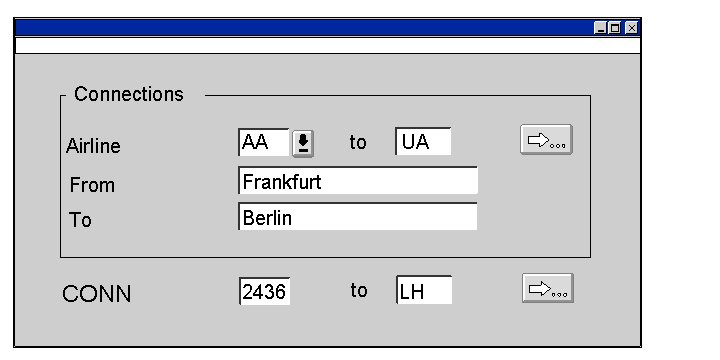
If the user fills the input fields as shown above, the output is as follows:
LH 2402 does not meet criterion
LH 2436 meets criterion
LH 2462 does not meet criterion
The following program does not use the NO DATABASE SELECTION option:
Syntax
REPORT demo_sel_screen_select_ldb_2.
NODES spfli.
SELECT-OPTIONS conn FOR spfli-connid.
GET spfli.
IF spfli-connid IN conn.
WRITE: spfli-carrid, spfli-connid, 'meets criterion'.
ELSE.
WRITE: spfli-carrid, spfli-connid,
'does not meet criterion'.
ENDIF.
With the same entries as above, the output appears as follows:
LH 2436 meets criterion
The result is the same as if you did not use the SELECT-OPTIONS statement, and the user selected Dynamic Selections in the application toolbar of the selection screen and then entered 2436 there.