 Scrolling by Columns
To scroll a list horizontally by columns, the SCROLL statement offers several options. A column in this case means one character of the list line.
Scrolling to Specific Columns
To scroll to specific columns, use the TO COLUMN option of the SCROLL statement:
Syntax
SCROLL LIST TO COLUMN col [INDEX idx].
If you do not specify the INDEX option, the system displays the current list starting from column col. If you specify the INDEX option, the system scrolls the list of list level idx. For more information on list levels, see Interactive Lists.
Scrolling by a Specific Number of Columns
To scroll a list by a specific number of columns, use the following option of the SCROLL statement:
Syntax
SCROLL LIST LEFT|RIGHT BY n PLACES [INDEX idx].
If you do not specify the INDEX option, the statement scrolls forward or backward n columns. The INDEX option specifies a particular list level as described above.
 Syntax
REPORT demo_list_scroll_4 NO STANDARD PAGE HEADING LINE-SIZE 200.
TOP-OF-PAGE.
WRITE: AT 161 'Top of Page', sy-pagno,
'SY-SCOLS:', sy-scols.
ULINE.
START-OF-SELECTION.
DO 200 TIMES.
WRITE sy-index.
ENDDO.
SCROLL LIST TO COLUMN 178.
This program creates a one-page list with a width of 200. If the current window width (stored in sy-scols) equals 40, the output of the program looks as follows:
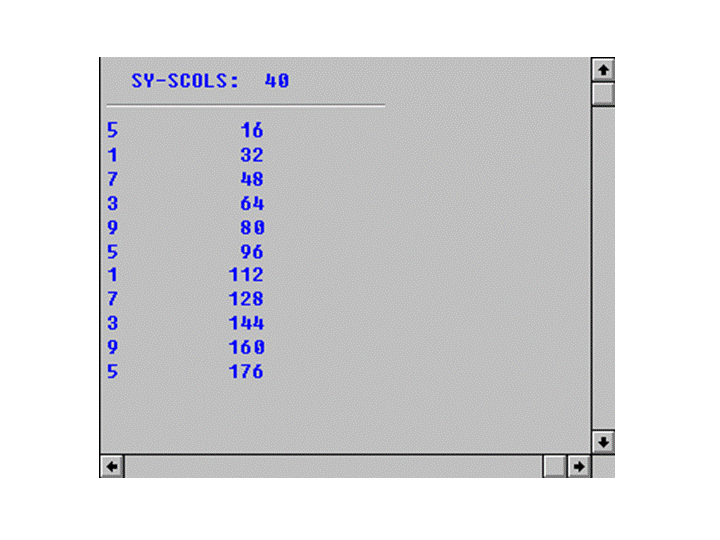
The list is displayed starting from column 178. The user can now scroll to the left of the list.