 Scrolling by Pages
To scroll a list by pages, that is, scroll vertically depending on the page length, the SCROLL statement offers several options.
Scrolling to Specific Pages
To scroll to specific pages, use the TO option of the SCROLL statement:
 Syntax
SCROLL LIST TO FIRST PAGE|LAST PAGE|PAGE pag
[INDEX idx] [LINE lin].
Without the INDEX option, the statement scrolls the current list to the first page, last page, or the page numbered pag. If you specify the INDEX option, the system scrolls the list of list level idx. For more information on list levels, see Interactive Lists.
If you specify the LINE option, the system displays the page to which it scrolls starting from line lin of the actual list. It does not count the page header lines.
Scrolling by a Specific Number of Pages
To scroll a list by a specific number of pages, use the following options of the SCROLL statement:
Syntax
SCROLL LIST FORWARD|BACKWARD n PAGES [INDEX idx].
If you do not specify the INDEX option, the statement scrolls forward or backward n pages. The INDEX option specifies a particular list level as described above.
Syntax
REPORT demo_list_scroll_2 NO STANDARD PAGE HEADING
                          LINE-SIZE 40 LINE-COUNT 8(2).
DATA: pag TYPE i VALUE 15,
      lin TYPE i VALUE 4.
TOP-OF-PAGE.
  WRITE: 'Top of Page', sy-pagno.
  ULINE.
END-OF-PAGE.
  ULINE.
  WRITE: 'End of Page', sy-pagno.
START-OF-SELECTION.
  DO 100 TIMES.
DO 4 TIMES.
WRITE / sy-index.
ENDDO.
ENDDO.
SCROLL LIST TO PAGE pag LINE lin.
This program creates a list of 100 pages with 8 lines per page. On each page, four lines are used for page header and page footer. Due to the SCROLL statement, the output of the program appears as follows:
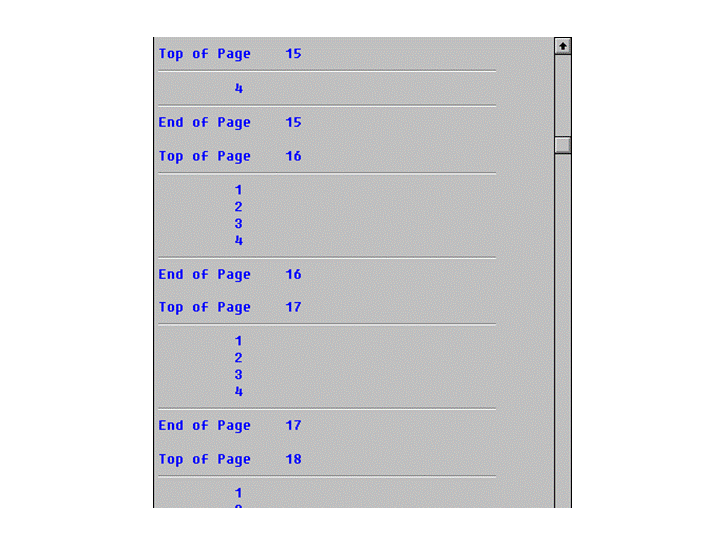
The list display starts at page 15. Due to the LINE option, the first three lines of the actual list are scrolled beneath the page header.