 Integration of the Serial Number in the Delivery
Purpose
Serial numbers exist in the delivery for stock transfers and for the goods receipt and goods issue processes.
If you have determined the master data of the respective products correspondingly, you can assign serial numbers to each item in the delivery. For serial number assignment, Extended Warehouse Management (EWM) opens a dialogue box in which you can make the desired entries.
 Note
Note
If you have determined (in the serial number definition in Customizing) that serial number assignment in the delivery is mandatory, you will only be able to post goods movements if you have created serial numbers for items that require them.
Prerequisites
For a description of the prerequisites, see Using Serial Numbers in the Delivery .
Process
Goods Receipt Process
In the goods receipt process, EWM copies the serial numbers from the ERP system into the inbound delivery notification .
Once EWM has copied the data from the ERP system into the inbound delivery notification, EWM also copies the serial numbers from the inbound delivery notification into the inbound delivery . A prerequisite for this is that you have determined the serialization for the product in the serial number profile. Otherwise EWM does not copy any serial numbers to the inbound delivery.
You can make changes to copied serial numbers in the user interface of the inbound delivery up until the goods receipt posting.
 Example
Your supplier sends a serial number with the advanced shipping notification. You have determined a serial number profile with serialization for the product. EWM copies the serial number from the inbound delivery of the ERP system to the inbound delivery notification and the inbound delivery.
End of the example.The following graphic provides an overview of the copying of a serial number from the inbound delivery data of the ERP system.

Either you or EWM carry out the goods receipt steps.
Goods Issue Process
In the goods issue process, EWM copies the serial numbers from the ERP system into the outbound delivery request .
If no serial numbers exist in the ERP system, EWM can receive serial numbers in one of the following ways:
A warehouse task exists for the outbound delivery order
If you confirm a warehouse task for products with the
Serial Number Requirement for Document Items
or theSerial Number Requirement at Warehouse Number Level
, EWM copies the serial numbers from the warehouse task into the outbound delivery order. You can also manually enter or scan the serial numbers in the outbound delivery order .If you confirm a warehouse task for products with the
Serial Number Requirement in Inventory Management
, EWM copies the serial numbers from the warehouse task into the outbound delivery order.
No warehouse task exists for the outbound delivery order
As soon as you specify a goods movement bin in an outbound delivery order, you can also specify the corresponding serial numbers.
Once EWM has copied the data from the ERP system into the outbound delivery request, EWM also copies the serial numbers from the outbound delivery request into the outbound delivery order and the outbound delivery . A prerequisite for this is that you have determined the serialization for the product in the serial number profile. In other cases, EWM does not copy any serial numbers into the outbound delivery order or the outbound delivery.
Unlike with the goods receipt process, you cannot make changes to copied serial numbers in the goods issue process.
The following figure provides an overview of the serial number entry options in the outbound delivery.
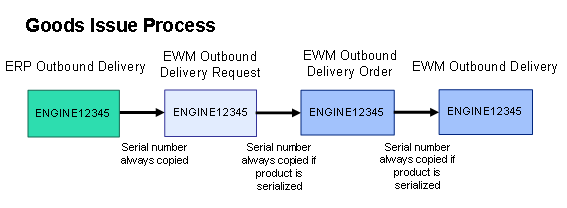
Either you or EWM carry out the goods issue steps.
Stock Transfers
The process during internal stock transfers (ad-hoc movements, for example) corresponds to that of the goods issue process.
Returns
The returns process corresponds to the process for goods receipt that has been described here.
Delivery Item Split
If the handling unit (HU) contains a serial number, you execute an HU-based delivery item split. On the
SAP Easy Access
screen, choose

Extended Warehouse Management

Delivery Processing
Outbound Delivery
Maintain Outbound Delivery Order
 and from there go to the
Create Split Item
pushbutton on the
HU
tab page.
If the serial number to be split is not contained in an HU, you carry out the delivery item split in the delivery. On the
SAP Easy Access
screen, choose
Extended Warehouse Management
Delivery Processing
Outbound Delivery
Maintain Outbound Delivery Order
and from there go to the
Subitem
pushbutton on the
Items
tab page.
See also: