Displaying OO Objects
The Debugger displays the attributes of classes, instances, and interfaces in a similar way to structured fields.
Procedure
To display an object in ABAP Objects:
-
Choose Fields.This opens the default display mode.
-
In the ABAP program code display, double-click the name of an object to place it in the field display. The Field contents field contains the object ID (class name and identification number).
-
Double-click the object ID. The Debugger opens the Object display mode.
NoteYou can also open the object display by choosing
 Goto
Goto  Display data object Object
  . However, in this case, you must specify the object ID explicitly.
 -
Adjust the display to your requirements by setting the Class Attributes and Instance Attributes options and selecting a visibility section (public, protected, or private).
-
Choose Filter to filter the attributes for the display. The object attributes are listed with their names, technical properties (data type and length), and their content. The display also contains the interfaces. You can display its attributes by choosing Expand.
Example:

If an attribute is a reference to another object, you can display the attributes of the referenced object by double-clicking the Field Contents of the object in the display.
If you enter the name of a class ( <name>) in the Object (ID) field, the system displays the static attributes of the class, regardless of whether it has been instantiated.
Additional Functions
Navigation
If you double-click the name of an attribute, the system opens the single field display. See also Data Object Attributes
If you double-click the name of an interface, the system displays only the attributes that belong to that interface.
References
If you position the cursor on a field in the field display that contains an
object reference, you can find all variables or attributes (both local and global) that point to the object by choosing
Goto System Find references . The same applies to
data references.
Displaying Events
The event display provides an overview of all of the events belonging to an object and the handlers that are registered for them.
To open the event display, choose Events. The system lists all of the events belonging to the object specified under Object (ID). The display lists the object IDs of all Handler Objects registered for the event and the Handler Methods that will be called when the event is triggered.
Example:
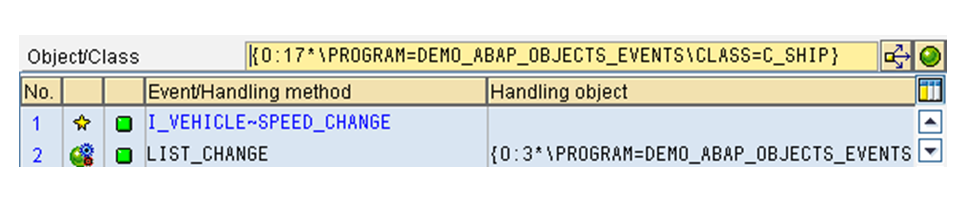
Use the Object pushbutton to return to the ABAP Objects display.
If you enter a class in the Object (ID) field ( <name>) and then choose Events, the system displays the handler methods and objects for all events of the class. The class does not have to have been instantiated.