Start the SAP Web IDE
Initial Steps in SAP Web IDE
- Open the SAP Web IDE and wait until the initialization has finished.
When you start it for the first time, you will see a home screen containing more information about the SAP Web IDE.
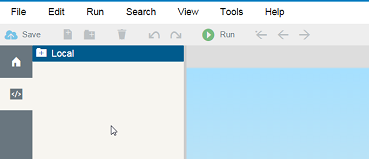
- Change to the Development perspective by clicking the icon with the
code symbol on the left toolbar.
You now see a folder list with an entry Local on the left side and an empty code editor on the right side.
-
Create your project within the Local folder by choosing the New Folder icon in the header toolbar. Enter, for example, myProject as the folder name.