
 Connecting a Semi-Automated
Warehouse
Connecting a Semi-Automated
Warehouse

Purpose
In a semiautomatic warehouse, you manage the warehouse using Extended Warehouse Management (EWM), whilst a linked non-SAP system performs the actual stock movements.
EWM performs all tasks relevant to warehouse management, including:
● Managing product stocks and storage bins
● Triggering warehouse movements (stock removal, putaway, stock transfers and posting changes)
● Determining the storage bins for warehouse movements based on fixed putaway and stock removal strategies
● Carrying out the inventory
To optimize the processes in the warehouse you use EWM and a non-SAP system to:
● Connect forklift systems
● Control automatic conveyors or conveyor equipment
● Allow picking without any documents, using RF devices
● Control the product flow

The following describes two variations of the scenario:
● EWM does not transfer any data using the EWM-WCU interface to the non-SAP system. You can only use this interface to tell EWM that stock movements have been performed.
● The EWM-WCU interface is used to transfer pending stock movements to the non-SAP system, as well as to report the execution of stock movements to EWM.
Prerequisites
You have configured the interface between EWM and the non-SAP system in Customizing for Extended Warehouse Management under Interfaces → Non-SAP Systems → Connect Subsystem.
Process
Reporting Using EWM-WCU Interface: Putaway
...
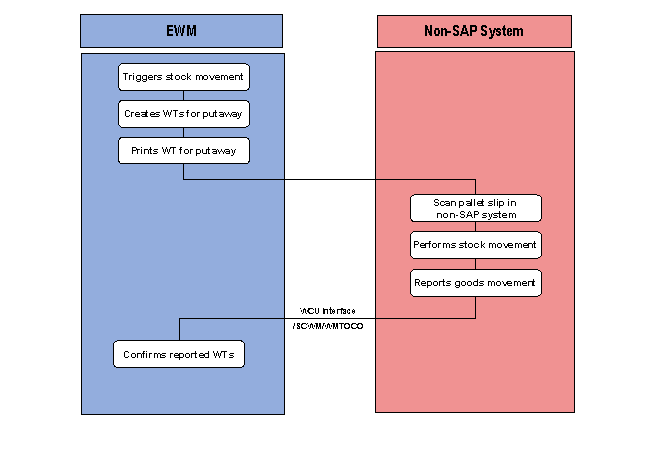
1. EWM creates warehouse tasks (WTs) for the goods movements.
2. You print the warehouse tasks to use as a pallet receipt/issue slip.
The destination storage bin for putaway is printed on the pallet slip in the form of a barcode.
3. You transport the pallet to the automatic conveyor.
4. You scan in the barcode with the destination storage bin at the automatic conveyor.
5. The automatic conveyor carries the pallet to the storage bin and puts it away.
6. If the Customizing settings are such that the WT transferred from EWM must be reported to EWM, then the non-SAP system reports the stock movement for the WT using the message type /SCWM/WMTOCO to EWM.
The non-SAP system constructs the warehouse task data in the form of an IDoc for the forklift guidance system, and sends this IDoc to EWM.
7. EWM confirms the warehouse task using the data reported using message type /SCWM/WMTOCO.
Reporting Using EWM-WCU Interface: Stock Removal

...
1. EWM creates warehouse tasks (WTs) for the stock removal.
2. You print the warehouse tasks to use as a stock removal list.
The source storage bin for stock removal is printed on the stock removal list in the form of a barcode.
3. You scan the barcode with the source storage bins into the automatic conveyor.
4. The automatic conveyor removes the pallet from storage.
If picking takes place directly at the storage bin, the automatic conveyor goes directly to the relevant source storage bin when you scan in the stock removal slip.
5. If the Customizing settings are such that the WT transferred from EWM must be reported to EWM, then the non-SAP system reports the stock movement for the WT using the message type /SCWM/WMTOCO to EWM.
The non-SAP system constructs the warehouse task data in the form of an IDoc for the forklift guidance system, and sends this IDoc to EWM.
6. EWM confirms the warehouse task using the data reported using message type /SCWM/WMTOCO.
Transferring warehouse tasks for warehouse movements to the external system
...
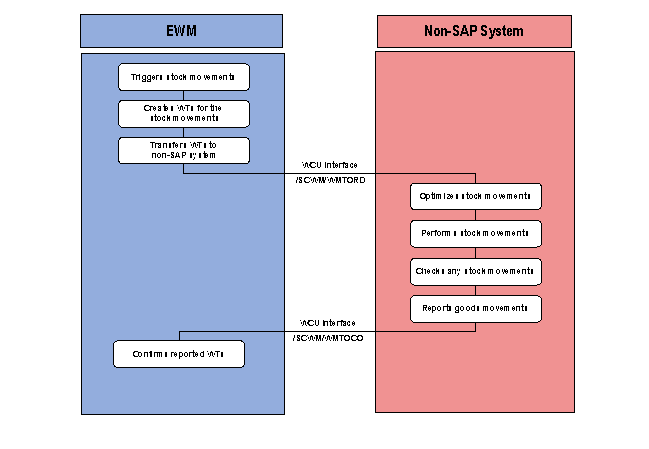
1. EWM creates warehouse tasks (WTs) for the goods movements.
2. EWM transfers the warehouse tasks using the message type /SCWM/WMTORD to the non-SAP system.
3. The external system executes the goods movements in the warehouse on the basis of the transferred data. The forklift control system monitors all of the movements.
4. If the Customizing settings are such that the warehouse task transmitted from EWM must be reported to EWM, then the non-SAP system reports the stock movement for the warehouse task using the message type /SCWM/WMTOCO to EWM.
The non-SAP system constructs the warehouse task data in the form of an IDoc for the forklift guidance system, and sends this IDoc to EWM.
5. EWM confirms the warehouse task using the data reported using message type /SCWM/WMTOCO.
Triggering warehouse movements manually via the external system
...
1. If you trigger stock movements manually (for example, due to a stock transfer within a warehouse, or because you are collating remainder quantities to make more room), then you enter the stock movement in the forklift guidance system.
2. The forklift guidance system reports the stock movement to EWM using message type /SCWM/WMTOCO.
The non-SAP system constructs the warehouse task data in the form of an IDoc for the forklift guidance system, and sends this IDoc to EWM.