 Serial Numbers at Warehouse Number Level
You use this serial number requirement to store serial numbers in goods receipt and goods issue. This provides you with an overview of which serial numbers are available in your warehouse.
Prerequisites
For a description of the prerequisites, see Making Settings for Serial Numbers (ERP-System and EWM).
Process
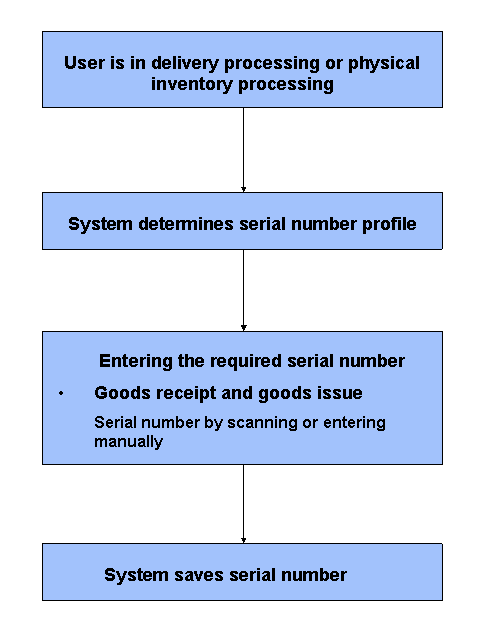
The following figure provides an overview of the process flow:
Serial Numbers at Warehouse Number Level
You are processing a delivery document for one of the following processes:
for inbound or outbound delivery
for a physical inventory
The product requires a serial number.
Extended Warehouse Management (EWM) determines the serial number profile of the product and checks whether you have determined Serial Number Requirement at Warehouse Number Level as a serial number requirement in Customizing (see also Serial Number Profile).
You are in delivery processing and confirm the corresponding warehouse task or you are working with serial numbers at the Work Center. You thereby replace the provisional serial number with the required serial number, either manually or by scanning.
You can only execute a goods receipt or goods issue posting if you have specified the required serial number. If you are working with provisional serial numbers in the goods receipt process, you must replace them with valid serial numbers. You can only do this before confirming the corresponding warehouse task for the final storage bin.
For more information about entering serial numbers, see Entering and Editing Serial Numbers.
For internal movements in the warehouse, the serialization requirement for document items does not apply. Therefore, you do not have to specify serial numbers for internal movements in the warehouse.
EWM saves the serial number in the delivery and sends it to the ERP system.
For more information, see SAP Library for SAP ERP under  SAP ERP
  Logistics Logistics - General (LO) Logistics Master Data (LO-MD) Administration of Serial Numbers (LO-SD-SN) Working with Serial Numbers
  .
.