 Pick, Pack and Pass During Picking
You use this function to coordinate picking, packing and transportation of products in different activity areas in your warehouse. For example, you transport products from one activity area to another using a conveyor belt. From an organizational point of view, an activity area can correspond to an aisle, for which a warehouse worker is responsible. As soon as the warehouse worker has picked a warehouse order in his area, he passes on the goods.
If you use this function, the system creates a higher-level warehouse order that contains the pick-HUs for all warehouse tasks that are to be created, which you pick one after each other. The warehouse worker also receives the warehouse order created for his activity area, together with its warehouse tasks.
Integration
You can use the Pick, Pack and Pass function most efficiently in an RF environment. The process flow is the same as for "standard" RF picking. You only have to make the Customizing settings mentioned in the prerequisites in Extended Warehouse Management.
For more information about RF picking, see RF Picking Flow.
Prerequisites
In Customizing for Extended Warehouse Management, define a warehouse order creation with the creation type for the pick, pack and pass function. You can choose between a system-controlled or user-controlled creation type.
Choose
 Extended Warehouse Management
  Cross-Process Settings Warehouse Order Define Creation Rule for Warehouse Orders.
In Customizing for Extended Warehouse Management, define the determination of the warehouse order creation rule defined in step 1 by doing one of the following:
Define a warehouse process type that contains the warehouse order creation rule defined above
Define the search sequence in Customizing for Extended Warehouse Management
Choose
Extended Warehouse Management Cross-Process Settings Warehouse Order Define Search Sequence of Creation Rules for Activity Areas.
In Customizing for Extended Warehouse Management, define a higher-level activity area for your activity areas by selecting the checkbox Merged.
Choose
Extended Warehouse Management Master Data Activity Areas Activities Define Activity Areas. Assign the individual activity areas to the higher-level activity area in the order you require.
Choose
Extended Warehouse Management Cross-Process Settings Warehouse Order Join Activity Areas Together. If you work with the system-controlled method, you have to define the source and destination storage bins for each activity area.
On the SAP Easy Access screen, choose
Extended Warehouse Management Master Data Storage Bin Assign Start/End Storage Bin for Activity Area .
Features
The destination storage bins are different for RF picking using pick, pack and pass and "standard" RF picking. In pick, pack and pass, warehouse workers pass the product from activity area to activity area until it arrives at the actual destination storage bin.
Picking |
Destination Storage Bin |
|---|---|
RF picking |
Destination storage bin, such as goods issue area |
RF picking using pick, pack and pass |
Storage bin of activity area from where the product moves to the next activity area |
You can use this function in either a system-controlled or user-controlled way.
System-controlled pick, pack and pass function
With this setting, the system specifies the sequence for processing the warehouse orders and corresponding pick-HUs.
It creates a higher-level warehouse order that contains all other warehouse orders that have been created. Only the first warehouse order in the sequence is active, all other warehouse orders are inactive. The sequence in which the system orders the warehouse orders corresponds to the sequence that you have defined in Customizing for the activity areas in the warehouse order creation rules.
During warehouse order creation, the pick-HU determination determines the suitable pick-HUs for all warehouse tasks of the warehouse order.
The system checks the warehouse order type. If you activated the pick, pack and pass function, the system creates a higher-level warehouse order that contains multiple warehouse orders sorted by activity area. The system only passes on the "standard" warehouse orders to resource management in Extended Warehouse Management.
User-controlled pick, pack and pass function
With this setting, the system creates the warehouse orders and the corresponding pick-HUs the same as for the system-controlled pick, pack and pass function. However, all created warehouse orders are active, and no sequence for processing them exists. The user takes a warehouse order that is valid for his or her activity area.
Example
The warehouse workers pick in the three activity areas P1, P2 and P3 in a system-controlled way using pick, pack and pass.
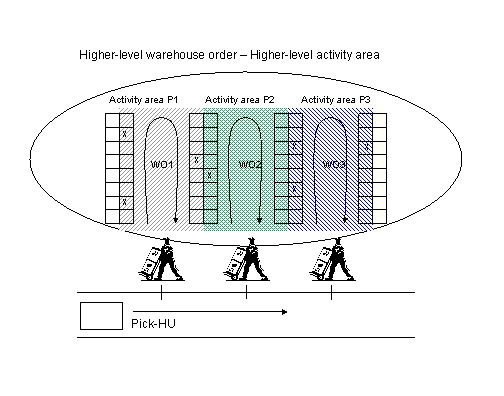
The system creates a higher-level warehouse order containing 7 warehouse tasks for the three activity areas P1, P2 and P3, and determines the pick-HUs for all warehouse tasks.
It then distributes the warehouse tasks across the 3 activity areas.
Each of the three warehouse workers receives their own warehouse order.
The warehouse worker takes the pick-HU from the source storage bin of his or her activity area.
The worker perfoms picking and puts the pick-HU in the destination storage bin of his or her activity area.
The pick-HU is moved from the destination storage bin of the activity area to the source storage bin of the next activity area.
The process is repeated from step 4. When it comes to the final activity area (P3), the worker puts the pick-HU in the original destination bin, such as the goods issue area, instead of in the destination storage bin of the activity area.