 Encrypting Message Content on Database Level
To increase data security, you have the option of encrypting the payload (and any attachments) of messages at the database level. This means that all messages configured in this way are stored in the message database encrypted. Users that query the message database, for example using SQL, cannot read the content of the payload.
Message payload and attachments is abbreviated to message content throughout this documentation.
 Note
Note
You can use this feature if you run scenarios that involve the exchange of sensitive data and you want to prevent malicious users from accessing this data.
For more information on how this function is related to the Payment Card Industry – Data Security Standard (PCI-DSS), see: Using SAP NetWeaver PI in PCI-Compliant Scenarios.
The encryption of the message payload at the database level has the following characteristics:
It can be activated for specific service interfaces.
This means encryption can be activated for specific scenarios that include the exchange of sensitive business data.
It affects the complete payload of the message.
When you activate encryption for a service interface, the complete payload will always be stored encrypted.
Note that encryption of the message payload in the database does not affect how the message content is displayed in monitoring.
Encryption is supported for messages stored in both the Advanced Adapter Engine message database and in the Integration Engine message database.
Limitations
If you plan to use this feature, consider the limitations summarized under Encrypting Message Content on Database Level (Limitations).
Procedure
You can configure message payload encryption at the database level for the different kinds of message processing that are supported by the available installation options. In particular, these are the following options:
Dual-stack message processing
In scenarios of this kind both the Integration Engine and the Advanced Adapter Engine (AAE) are involved in message processing at runtime.
Scenarios of this kind are only possible with a dual-stack PI installation.
Message processing using AAE only
In scenarios of this kind only the Advanced Adapter Engine (AAE) is involved in message processing at runtime.
Scenarios of this kind can be implemented either as local message processing using a dual-stack implementation or when using the Advanced Adapter Engine Extended (AEX).
For more information on these options, see Installation Options.
The individual configuration procedure depends on the involved components. This is the general procedure.
Note
There are two examples below.
Configuring service interfaces (applicable for dual-stack or AAE-only message processing)
Indicate the service interfaces in the Enterprise Services Repository for which message encryption should be activated.
More information: Configuring Service Interfaces for Encryption (ES Repository)
Configuring Advanced Adapter Engine (applicable for dual-stack or AAE-only message processing)
You need to configure message encryption in the AAE.
More information: Encrypting Message Content on Database Level (AAE)
Configuring central Integration Engine (applicable only for dual-stack message processing)
You need to configure message encryption in the central Integration Engine (IE) that is part of the Integration Server.
More information: Encrypting Message Content on Database Level (Central IE)
Configuring business systems with local Integration Engines (applicable for dual-stack or AAE-only message processing)
If the scenario involves business systems with a “local” Integration Engine, you need to perform additional configuration steps in the connected back-end systems.
More information: Encrypting Message Content on Database Level (Local IE)
Configuring message processing in the Integration Directory (applicable for dual-stack or AAE-only message processing)
Proceed as described under Setting up Scenarios Using Dual-Stack Message Processing or Setting Up Scenarios Using Local AAE-Based Message Processing (in section 2. Configure Integration Content).
NoteEnd of the note.Also note the following:
Make sure that the relevant service interfaces specified as sensitive are assigned to the involved communication components. If you are using business components, you need to assign the relevant service interfaces manually.
 Recommendation
Note these general recommendations on how to handle keys:
Be careful if you plan to delete keys. If you have deleted a key, a message (that has been stored encrypted) remains in the database but can no longer be opened. Do not rename keys during productive scenarios.
Configuration Tasks for Different System Landscapes
The configuration procedure and the involved configuration tools depend on the involved components at runtime. The following figure illustrates a possible setup of components when using dual-stack message processing.
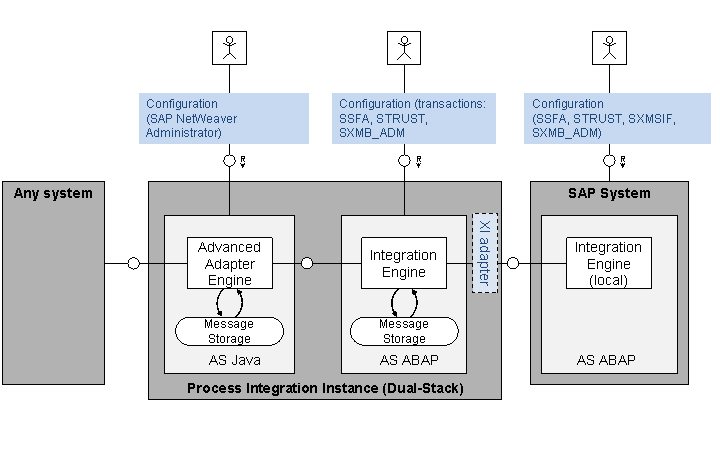
Setup of Components when Using Dual-Stack Message Processing
In the illustrated setup an adapter of the AAE is used to connect the PI instance to a system that is not specified in more detail. The Integration Engine is used to connect the PI instance to an SAP system (via the XI adapter).
To configure message encryption for this setup, you need to perform the following configuration tasks:
Configuring service interfaces for encryption (as described under Configuring Service Interfaces for Encryption)
Configuring the AAE (as described under Encrypting Message Content on Database Level (AAE))
Configuring the (“central”) Integration Engine hosted on the PI instance (as described under Encrypting Message Content on Database Level (Central IE))
Configuring the “local” Integration Engine in the connected SAP system (as described under Encrypting Message Content on Database Level (Local IE))
The following figure illustrates a possible setup of components when only the AAE is involved in message processing .
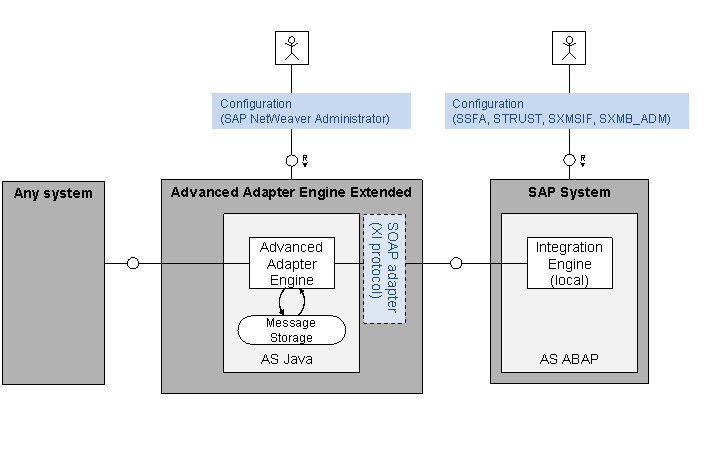
Setup of Components when Using AAE-Only Message Processing
In the illustrated setup, an SAP system is also connected to the PI instance based on the XI message protocol (configured in the SOAP adapter).
To configure message encryption for this setup, you need to perform the following configuration tasks:
Configuring service interfaces for encryption (as described under Configuring Service Interfaces for Encryption)
Configuring the AAE (as described under Encrypting Message Content on Database Level (AAE))
Configuring the “local” Integration Engine in the connected SAP system (as described under Encrypting Message Content on Database Level (Local IE))