 Architectural Overview of SAP Host Agent
The following graphics provide an overview about SAP Host Agent and its components.
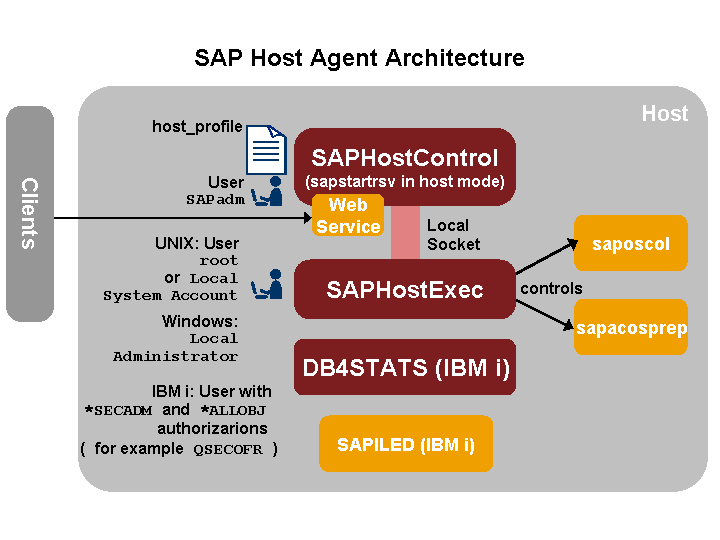
Overview of the Architecture of SAP Host Agent
Executables and Services
The executable directory of SAP Host Agent is in the following location:
UNIX:
/usr/sap/hostctrl/exe
Windows:
%ProgramFiles%\SAP\hostctrl\exe
IBM i:
/usr/sap/hostctrl/exe and objects in library R3SAP400
SAP Host Agent has the following executable programs and services:
The control program saphostexec
saphostexec is an executable program that runs under root (UNIX) or the LocalSystem account (Windows). It controls all of the functions for which a special user of this type is required, such as the operating system collector saposcol and sapacosprep. It is connected to sapstartsrv in host mode (see below) using a local socket, which ensures quick and secure communication and is also started during the startup of the host.
The operating system collector saposcol
The SAP NetWeaver management agent saphostcontrol (sapstartsrv in host mode)
saphostcontrol is the executable sapstartsrv running in host mode under user sapadm. It is therefore not responsible for an SAP instance, but for any monitoring jobs on the host that is to be monitored centrally.
The profile that is used when the executable is started determines whether sapstartsrv runs in host or in instance mode. In instance mode, it runs with the instance profile of the corresponding instance, in host mode with its own host profile.
 Note
NoteSAPHostControl contains the functionality of the previous CCMS agent SAPCCMSR, that is, the agent that monitors hosts. For more information, see Central Monitoring with SAP NetWeaver Management Agents in the SAP NetWeaver Application Server ABAP (AS ABAP) documentation.
End of the note.sapacosprep
sapacosprep is an executable program of the Adaptive Computing Infrastructure that, for example, mounts the file systems and activates the IP addresses.
DB4STATS program and command (IBM i only )
The DB4STATS program and command are partly contained in the R3SAP400 library. They provide the SAP Database Performance Collector for IBM i. You can find a detailed description of this collector in SAP Note 1622665 and in the documentation attached to this SAP Note.
SAPILED (IBM i only )
The SAP ILE daemon is needed to update ILE components (objects in libraries) from the patch archive after installing a SAP kernel patch. You can find a detailed description of the SAP ILE daemon in SAP Note 1637588.
Note
The installed programs are started automatically when the host is booted.
On Windows hosts, this is done by the services SAPHostControl and SAPHostExec.
On UNIX hosts the automatic start is ensured by the startup script sapinit that starts the required executables.
On IBM i, the programs are started by the auto-start job entry SAPINIT in subsystem QUSRWRK, which was created during the installation.
Profile File
The profile parameters of SAP Host Agent are stored in the host_profile file. This file is located in the executable directory of SAP Host Agent (see Executables and Services above).
Working Directory
The working directory of SAP Host Agent is in the following location:
UNIX and IBM i: /usr/sap/hostctrl/work
Windows: %ProgramFiles%\SAP\hostctrl\work
The working directory contains, among other things, the following configuration files:
CSMCONF
Start file for the agents that contains connection data for the central monitoring system
SAPCCMSR.INI
Contains information about the extent to which plug-ins, log files, and SAPOSCOL information should be considered; this file is read when the agent is started. For more information, see Parameters of the SAPCCMSR.INI Configuration File in the SAP NetWeaver Application Server ABAP (AS ABAP) documentation.
In an ABAP system, you can display all files in the working directory of SAP Host Agent in the central monitoring system. You can use transaction RZ21 to do this. In the Topology group box, select one of the Agents for… radio buttons. The Monitoring: Display Technical Topology screen appears. Now select SAP Host Agent and then choose Working Directory of the Agent. The system displays the files of the directory. To display the contents of a file, choose the file by double-clicking it.
Log Files
The following log files are created during runtime for SAP Host Agent. They are available in the working directory of SAP Host Agent:
sapstartsrv_ccms.log
This log file is for central monitoring. It is stored in subdirectory sapccmsr of the working directory.
sapstartsrv.log
Contains the developer trace for sapstartsrv
dev_saphostexec.log
Contains the developer trace for saphostexec.
A log file is also created during runtime for SAP Host Agent with the name sapstartsrv_ccms.log, and log files are created for RFC communication. The log file is stored in subfolder sapccmsr of the working directory.
AL Files
For system instances, the AL* files (ALMTTREE, ALPERFHI, and ALALERTS) are in the $DIR_LOGGING directory. These files contain the monitoring segment data. This data is saved every 30 minutes during running operation and when the instance is shutdown, and is read again when the instance is started.
SAP Host Agent has its own monitoring segment, for which the AL* files are in the directory /usr/sap/tmp (on UNIX and IBM i) or \\<host>\usr\sap\PRFCLOG (on Windows).