 Unit 5: Agent Determination - Organizational Plan
Certain employees are notified by mail as a response to the release of the production order.
In addition to the existing organizational plan of your enterprise, all employees who are to receive the mail are to be grouped together in a separate, isolated organizational unit. The organizational unit is used as a distribution list in this scenario. The organizational unit is assigned existing positions, which are also used in the organizational plan of the enterprise. As a result, the recipient group is determined dynamically from the holders of the positions.
Procedure
You create an organizational unit and assign it positions. These positions are assigned users.
Creating Organizational Units
Choose
 Tools
Tools  Business Workflow Development Definition Tools Organizational Management Organizational Plan Create
  .
.Confirm the validity period proposed in the Creating a Root Organizational Unit dialog box.
This takes you to the Create Organization and Staffing (Workflow) screen. This user interface is divided into four screen areas:
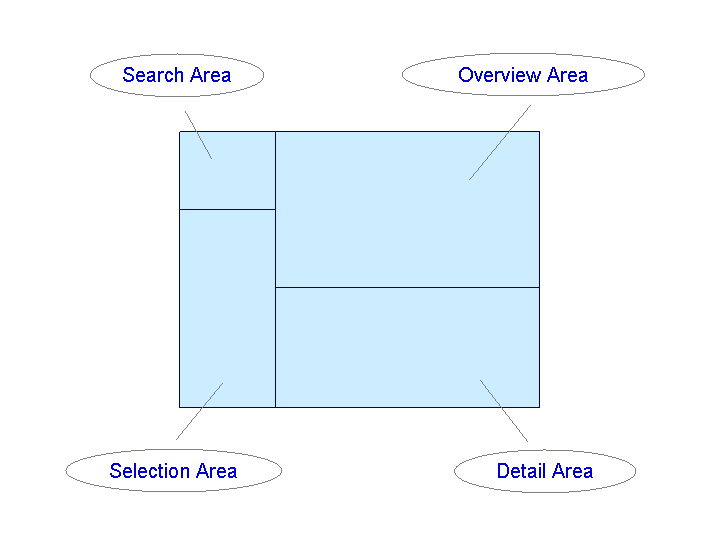
On the Basic Data tab in the detail area, enter an abbreviation and a name in the Organizational unit input fields.
Abbreviation: Zini_OrderRel
Description: Release production order
Choose
 .
.
Assigning positions
In the staff assignments, you assign the organizational unit positions that are also used in the organizational plan of your enterprise.
Change to the overview area in the staff assignments of the organizational unit, in order to assign positions, jobs, and holders. Choose the arrow
 on the right next to the
  and then Staff Assignments (list).
The staff assignments of the new organizational unit are displayed.
Select positions in the search area and enter a search range.
The positions that were found are shown in the selection area.
Select the position that you want to copy to the staff assignments and drag it to the staff assignments table in the overview area. Repeat this procedure until all of the necessary positions have been assigned to the organizational unit.
 Note
NoteNote that you also select a position to which you are assigned as a user, so that you can check the successful execution of the scenario.
End of the note.Choose
and exit the screen for editing the organizational plan.