 Registering and Handling an Event
Registration for a Portal Event
To register your Web Dynpro application for a portal event, method SUBSCRIE_EVENT is available in interface IF_WD_PORTAL_INTEGRATION.
 Note
Note
To delete your registration of the portal event, use method UNSUBSCRIBE_EVENT in the portal manager.
Note
Registrations or registration deletions must be performed separately for each view in the respective WDDOINIT method.
Generate an appropriate template using the Web Dynpro Code Wizard. You can then fill this with values.
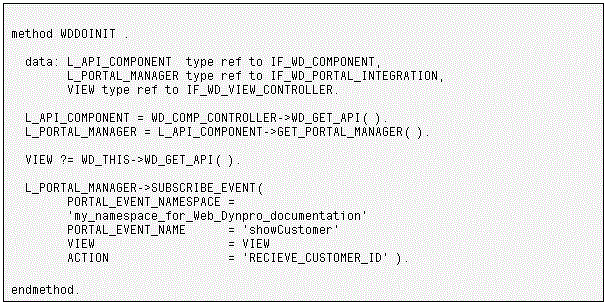
Enter the namespace and the name of the event. The combination of namespace and event name must be unique. In addition, enter the name of the action that is to be triggered if this particular portal event is to be received. The corresponding action handler is then called automatically.
 Caution
The action, in this case RECEIVE_CUSTOMER_ID, is not created automatically. You have to create this action explicitly on tab page Actions in the view.
Handling a Portal Event
The parameters of a portal event are passed to action parameter WDEVENT using its method GET_STRING. Using optional parameter PORTAL_EVENT_PARAMETER, application-dependent information can be passed to the handler method. In the following example, this is the ID of a specific customer and this value is passed to the SHOWCUSTOMER method of the component controller, which is then called.
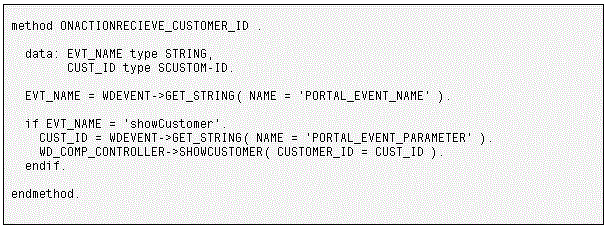
Example
You can find examples in the following Web Dynpro applications in the system:
WDR_TEST_PORTAL_EVENT_REC
Receives a portal event
WDR_TEST_PORTAL_EVENT_REC2
This application is also used as a test application. You can enter the name of an event from your own application in order to test the event separately.