 Approval Process
You can define approval workflows for folders. The relevant approval status controls the visibility of documents in these folders. In the various approval steps, the system sends notifications to the approvers. Each notification is sent both by e-mail and in the form of a task in the universal worklist.
The figure below shows the status in the life cycle of a document and the steps that lead to status changes.
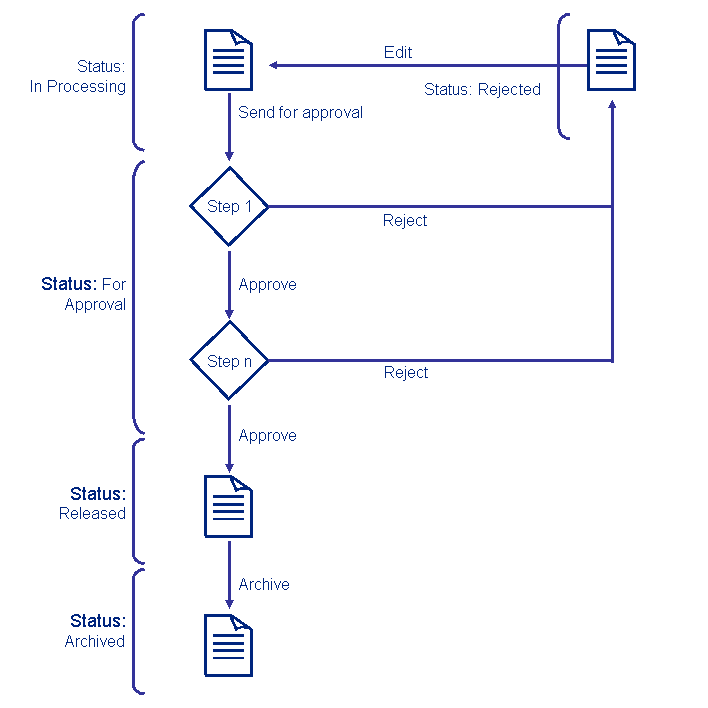
Status |
Description |
|---|---|
In Processing |
This status is assigned as soon as an author creates a document in the folder. The document is visible for users with write permission or with the service permission Approver Administration. If there is more than one version of a document, anyone with read access only can see the version that has most recently been released. |
For Approval |
This status is assigned as soon as the author has sent the document for approval. This status triggers the approval workflow. The document is visible for:
|
Rejected |
This status is assigned as soon as an approver rejects the document. The rejecting approver can use the feedback function to inform the author of the reason for the rejection. The user who submitted the document for approval receives a notification. The document is visible for:
|
Released |
This status is assigned as soon as the last step of the approval process has been completed. The document is visible for all users with read permission. If the document is contained in an indexed data source, the system starts indexing the document at this point. Only after this can users search for the document. After the document has been released, the system sends notifications about the document to all subscribed users. |
Archived |
This status is assigned as soon as you have archived the document. The physical file remains in the folder, but the document is visible only for users with write permission or the service permission Approver Administration. The system removes the document from the index so that users can no longer search for it. |
Terminating the Approval Process
During the approval process, you cannot make any changes to the document.
If you edit a document during the approval process, the system terminates the approval process. Authors can submit the document again for approval. However, the document is subject to the entire approval process again.
This ensures that the version of the document visible in the portal is the one that all approvers have seen.
Skipping the Approval Process.
Users with the service permission Approver Administration can skip the approval process and thus release the document directly.
Deactivating the Approval Process.
If you deactivate the approval process, the system irretrievably deletes all status information. This has the following consequences:
The system deletes the status and the list of approvers in all documents.
The system deletes the tasks for approving the documents in question from the universal worklist.
If you reactivate the approval process later on, all documents receive the status In Progress again.
Propagating the Approval Settings
You can propagate the approval settings of a folder to its subfolders. When you propagate the settings of a parent folder, all subfolders, including indirect children, inherit the approval settings defined for the parent folder. The system overwrites any approval settings defined for the subfolders with the ones of the parent folder. However, the resources that are already in the approval process keep their status unchanged.
The propagation of approval setting is not executed in the following cases:
If any of the steps contains a non-existing approver.
The portal is running in read-only mode.
If the number of users assigned to any of the defined steps is larger than the maximum allowed number specified in the service configuration.
Inheritance of the Approval Settings
When you enable the approval process for a folder, the system checks if the approval process for its direct parent is also activated. If the parent folder has an activated approval process, the system takes the steps defined for this process as suggested values for the approval process for the child folder. You can save these values or define new steps for the process.