 Using the Report-Report Interface
The report-report interface (RRI) allows you the flexibility to call a jump target (receiver) online from a BEx query (sender) within or outside of the BW system. Jump targets that have been assigned to a BEx query can be selected in BEx Web applications and in the BEx Analyzer. You access them from the context menu under the Goto function.
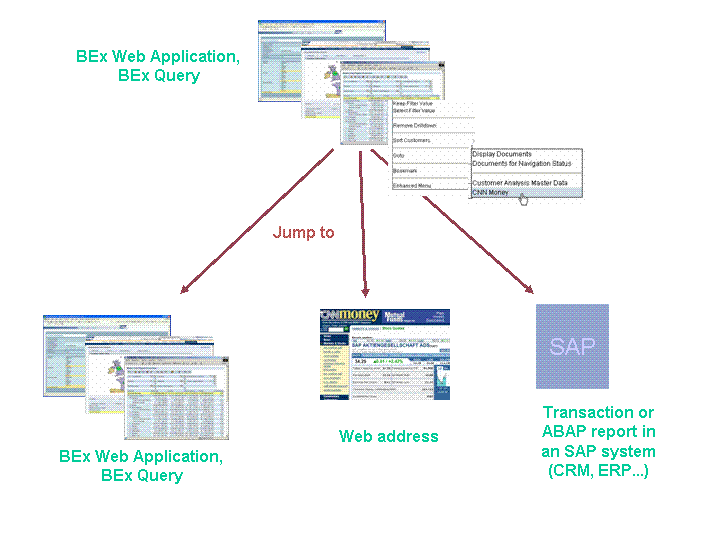
Queries, transactions, reports, and Web addresses can be jump targets. The parameterization of the target action is taken from the context of the cell that you have jumped from. You can set parameters for calling a BEx Query or a BEx Web Application using input variables that are filled from the selection conditions and the element definitions of the selected cells in the sender query.
More information about the exact process: Process when Calling the RRI
Prerequisites
If you want to jump from a Web application to a transaction or ABAP/4 report using the RRI, first you need to install an Internet Transaction Server (ITS) for the target system. The transaction or ABAP report is than displayed in the SAP GUI for HTML, which is part of the ITS. The ITS is also used for jump targets within the BW server. However, this does not have to be installed separately because it is automatically included in a BW system. The URL for starting a transaction in SAP GUI for HTML is generated by the BW server.
Procedure
1. Creating Sender/Receiver Assignments
To use the RRI in a BEx Query or Web application, you first have to make the necessary settings with sender/receiver assignment.
More information: Changing and Creating Sender/Receiver Assignments
2. Opening Other BEx Queries or Applications from the BEx Analyzer
For detailed analysis, you can open other BEx queries or applications from an executed query in the BEx Analyzer.
More information: Goto
3. Embedding a Call of the Report-Report Interface in Web Applications
You can use the command wizard to open other queries or applications from an executed BEx Web application.
More information: Report-Report Interface
4. Opening Other BEx Queries or Applications from a BEx Web Application
For detailed analysis, you can open other BEx queries or applications from an executed BEx Web application.
More information: Goto
Example
For your cost center report (Sender), you want to request master data from an SAP system (Receiver).
For a BEx Query with the up-to-date sales figures for your customer (Sender), you want to request up-to-date stock market data on your customer listed on the stock exchange from the Internet.