Loading Hierarchies Using a Process Chain
If you want to automatically load and schedule a hierarchy, you can include this as an application process in the procedure for a process chain.
Prerequisites
You have already created an InfoPackage for loading your hierarchy (see Loading Hierarchies)..
Procedure
You can load a hierarchy into a process chain using one of the following methods:
You can create your process chain from the InfoPackage maintenance by choosing
 (Process Chain Maintenance). The system guides you step-by-step through the process of creating the process chain.
You can call process chain maintenance directly from the SAP Easy Access Menu: Choose
 Administration
  Process Chains
  . Perform the following steps:
Choose
(Edit Process Chains) from the symbol bar in Data Warehousing Workbench. The Process Chain Maintenance Planning View screen appears.In the left-hand screen area of the required
 display component, navigate to the process chain where you want to insert your hierarchy loading process and double-click to select it. The system displays the process chain plan view in the right-hand screen area.
If no suitable process chain is available, create a new process chain. For more information, see Creating Process Chains.
To insert a process for loading a hierarchy, choose
 (Process Types) in the left-hand area of the screen. The system displays the available process categories.
In process category Loading Process and Postprocessing, choose application process type
 (Execute InfoPackage).
Drag the Execute InfoPackage application process type to the process chain. The dialog box for inserting a process variant appears.
Use input help to select the InfoPackage you want to include in the process chain.
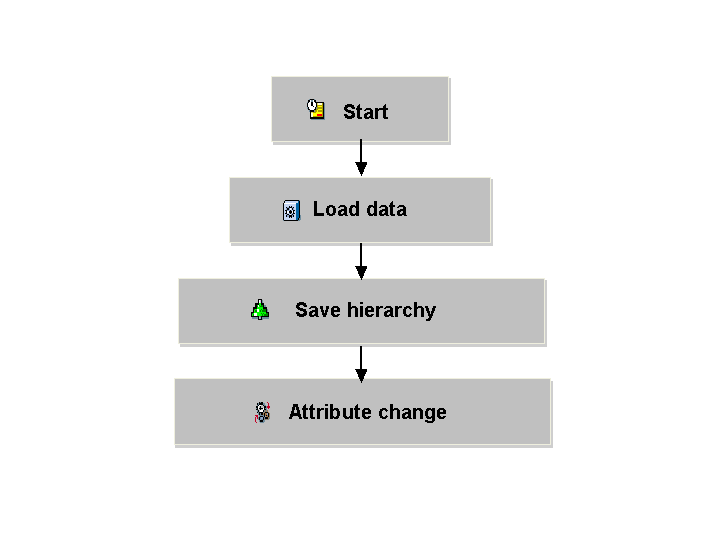
Confirm your entries. The system automatically adds the processes
 (Save Hierarchy (BW 3.x)) and
  (Change Run) to your process chain. With SAP NetWeaver 7.1 you need to insert the
  (Data transfer process) manually using drag and drop.
 Note
NoteFor 3.x DataSources: You can specify multiple InfoPackages in this process variant so that multiple hierarchies can be saved with one variant. The sequence specified in the variant is not maintained here however. If you want to keep the sequence, for example when saving hierarchies as a subtree, you need to insert a Save Hierarchy process after each hierarchy loading process. These Save Hierarchy processes have to be saved serially, one after the other.
End of the note.
Process |
What You Need to Know |
|---|---|
|
This process always has to be included in a process chain where a hierarchy is loaded. If the data transfer process is missing or is not used, the data is not written to the hierarchy tables from the PSA. This means that the hierarchy is not saved in the BW system. Set the indicator for Activate Hierarchies After Loading or Note for Activation if the hierarchy needs to be automatically saved and activated after loading. The corresponding option in the InfoPackage is not sufficient, because it is only used if the hierarchy loading process (manual) is scheduled using this InfoPackage (see Loading Hierarchies). If you do not set the indicator for activating the hierarchy in the Data Transfer Process, only a modified version of the hierarchy (M version) is saved in the BW system. The hierarchy is not directly activated however. |
|
This process always has to be included in a process chain where a hierarchy is loaded. If the Saving Hierarchies process is missing or is not used, the InfoPackage goes nowhere. This means that the hierarchy is not saved in the BW system. Set the flag for Activate Hierarchies After Loading or Note for Activation if the hierarchy needs to be automatically saved and activated after loading. The corresponding option in the InfoPackage is not sufficient, because it is only used if the hierarchy loading process (manual) is scheduled using this InfoPackage (see Loading Hierarchies). If you do not set the indicator for activating the hierarchy in the Save Hierarchy process, only a modified version of the hierarchy (M version) is saved in the BW system. The hierarchy is not directly activated however. |
|
This process is need if the hierarchy occurs in aggregates. If you set the flag for Activate Hierarchies after Loading in the Save Hierarchy process and have adopted the Change Run process in the chain, the hierarchy is activated by the change run. If you are not using any aggregates, you can delete this process from the process chain. |
Continue as described in Creating Process Chains.
Result
You have included your hierarchy loading process in a process chain.
Example
The following graphic illustrates an example of how a process chain is used to load a hierarchy.