
 Use of Links

Use
The repository
framework supports linking between resources.
A link is a reference to
a resource (link target). If a link refers to a target that no longer exists,
it is a broken link.
Features
The repository framework implements two types of links; internal and external.
Internal links refer to resources that are integrated in the repository framework. The resources can be located in the same repository as the link or in another framework repository. Normally, internal links are broken if the target resource is moved or renamed. This type of internal link is called static. However, a special type of internal link, the flexible link, can follow its target dynamically. If the target moves or changes its name, the link remains intact and still points to the right resource. The target of a flexible link must reside in the same repository as the link itself. If the target is moved to another repository, the link is deleted. However, you can create an internal dynamic link referencing an object located in a KM repository that is different from the one in which the link was created, only if the following requirements are fulfilled:
● Both the repository manager in which you create the link and the target repository manager are CM repositories.
● Both the CM repository in which you create the link and the target CM repository are operated in DB or DBFS persistence mode.

FSDB persistence mode is not supported.
● The security manager configured for the two CM repositories is the same.
● The CM repository manager in which the link is created has the parameter Internal Links Default to Dynamic activated.
Flexible links are also called dynamic links.
External links refer to resources that are stored in repositories that are not integrated in the framework. For example, a link to a resource on a web site that is not mapped to a repository manager is an external link.
Example
The figure shows both internal and external links.
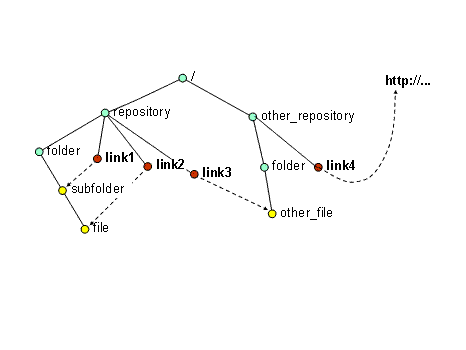
Link 1, link 2 and link 3 are internal because they refer to resources within the framework:
●
Link 1
/repository/link1points to the collection /repository/folder/subfolder
●
Link 2 /repository/link2 points to the resource /repository/folder/subfolder/file
●
Link 3
/repository/link3points to a resource in another framework repository
/other_repository/folder/other_file.
●
Link 4
/other_repository/link4
is an external link
because it points to a URL that refers to an external web resource.
A web repository manager can map URLs to the namespace of the repository framework. In this way, external web resources become integrated in the framework and can be referenced with internal links.
See also: