Show TOC

Background documentationSAP System Directories on UNIX Locate this document in the navigation structure


Here you can find information about the directory structure of an SAP system.

An SAP system contains the following types of directories:

  • Physically shared directories, which reside on the global host and are shared by Network File System (NFS)

  • Logically shared directories, which reside on the local host with symbolic links to the global host

  • Local directories, which reside on the local host

The figures below assume that you have set up one file system for the SAP system mount directory /<sapmnt> and one file system for the /usr/sap directory.

Standard SAP Directories for an ABAP System (Unicode or Non-Unicode)

An ABAP system can be Unicode or non-Unicode.
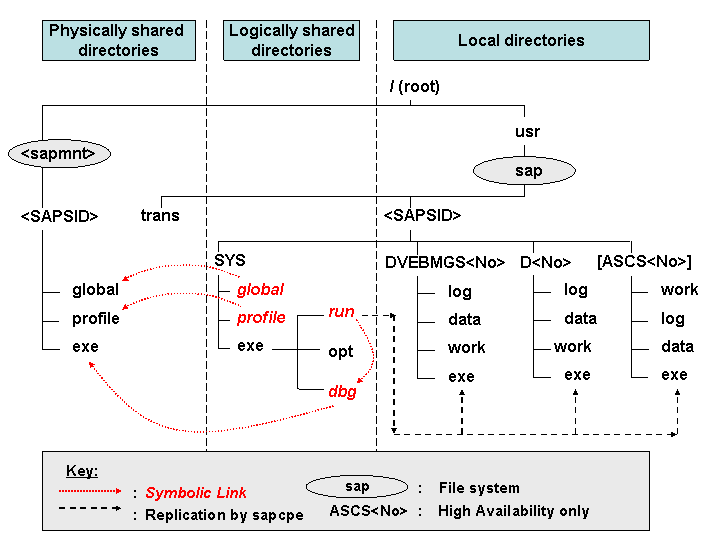
This graphic is explained in the accompanying text.

Standard SAP Directories for a Dual-Stack (ABAP+Java) System

An dual-stack system can be Unicode or non-Unicode. That is, the ABAP system can be Unicode or non-Unicode, whereas the Java system can only be Unicode.

  • Standard SAP Directories for a Dual-Stack (ABAP+Java) System (ABAP Unicode):

    This graphic is explained in the accompanying text.

  • Standard SAP Directories for a Dual-Stack (ABAP+Java) System (ABAP non-Unicode):
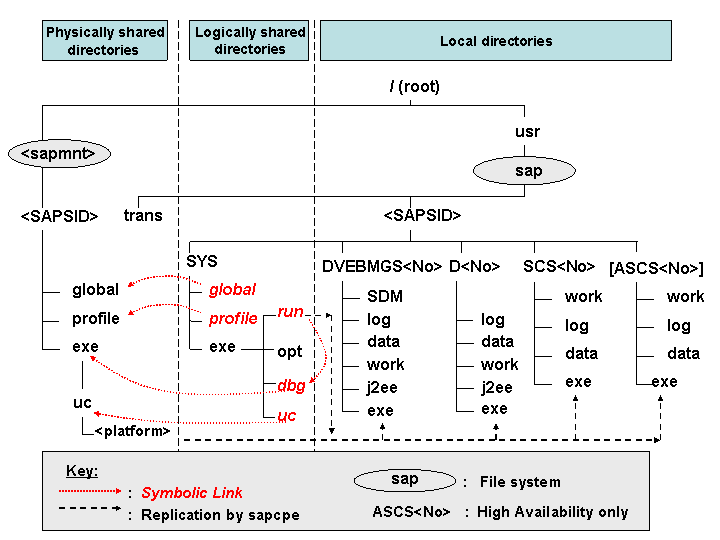
    This graphic is explained in the accompanying text.

Standard SAP Directories for a Java System (Unicode)

A Java system can only be a Unicode system.

This graphic is explained in the accompanying text.

SAP System Directories in Detail

Directory

Description

/<sapmnt>/<SAPSID>

Software and data for one SAP system

This directory and its subdirectories need to be physically shared using Network File System (NFS) and mounted for all hosts belonging to the same SAP system. It contains the following subdirectories:

  • exe

    This directory contains executable kernel programs. In an SAP system with distributed instances, this directory must be shared for all hosts with the same operating system.

    Note Note

    ABAP (Non-Unicode) + Java system only

    exe contains a folder uc with a platform-specific subfolder: <sapmnt>/<SAPSID>/exe/uc/<platform>

    End of the note.
  • global

    This directory contains log files. In an SAP system with distributed instances, this directory must be shared for all hosts with the same operating system.

  • profile

    This directory contains the start and operations profiles of all instances. In an SAP system with distributed instances, this directory must be shared for all hosts with the same operating system.

/usr/sap/<SAPSID>

Instance-specific data, symbolic links to the data for one system

This directory contains files for the operation of a local instance.

  • There is a subdirectory for each instance. Each instance directory has the name of the related instance.

    • The instance name (instance ID) of the ABAP central instance is DVEBMGS<Instance_Number>, and the instance name of an ABAP dialog instance is D<Instance_Number>. In a high-availability system, there is also an ABAP central services instance called ASCS<Instance_Number>

      Example Example

      The file system structure might look as follows:

      On a central instance with SAP system ID C11 and instance name DVEBMGS00, the ABAP dialog instance has the instance name D01.

      End of the example.
    • The instance name (instance ID) of the ABAP+Java central instance is DVEBMGS<Instance_Number>, the instance name of the Java central services instance is SCS<Instance_Number>, and the instance name of an ABAP+Java dialog instance is D<Instance_Number>. In a high-availability system, there is also an ABAP central services instance called ASCS<Instance_Number>

      Example Example

      The file system structure might look as follows:

      On a central instance with SAP system ID C11 and instance name DVEBMGS00, the J2EE Engine is installed in /usr/sap/C11/DVEBMGS00/j2ee, and the corresponding Software Delivery Manager (SDM) is installed in /usr/sap/C11/JC00/SDM

      On a dialog instance with instance name D01, the J2EE Engine is installed in/usr/sap/C11/D01/j2ee. No SDM is installed.

      End of the example.

      Note Note

      The subfolder SDM is only available for the central instance.

      End of the note.
    • The instance name (instance ID) of the Java central instance is JC<Instance_Number>, the instance name of a Java dialog instance is J<Instance_Number>, and the instance name of the Java central services instance is SCS<No>.

      The instance name (instance ID) of the central instance is JC<Instance_Number>, the instance name of a Java dialog instance is J<Instance_Number>, and the instance name of the Java central services instance is SCS<Instance_Number>.

      Example Example

      The file system structure might look as follows:

      On a central instance with SAP system ID C11 and instance name JC00, the J2EE Engine is installed in /usr/sap/C11/JC00/j2ee, and the corresponding SDM is installed in /usr/sap/C11/JC00/SDM.

      On a dialog instance with instance name J01, the J2EE Engine is installed in /usr/sap/C11/J01/j2ee. No SDM is installed.

      End of the example.
  • The directory /usr/sap/<SAPSID>/SYS contains soft links to appropriate directories in /<sapmnt>/<SAPSID>/ for storing data used by several instances.

    SYS is logically shared and available on each host of the SAP system. Its subdirectories contain symbolic links to the corresponding subdirectories of /<sapmnt>/<SAPSID> on the SAP global host, as shown in the figures above.

Whenever a local instance is started, the sapcpe program checks the executables against those in the logically shared directories and, if necessary, replicates them to the local instance.

For more information about sapcpe, see The sapcpe Program documentation.

Executables located in/usr/sap/<SAPSID>/SYS/exe/run are replicated by sapcpe to the exe subdirectory of the instance directories.

/usr/sap/trans

Global transport directory for all SAP systems

The global transport directory is used by the Change and Transport System (CTS). The CTS helps you to organize development projects in the ABAP Workbench and in Customizing, and then transport the changes between the SAP systems in your system landscape. For more information, see the Change and Transport System documentation.