 Defining Message Splits
You can set up scenarios where a message is split into several fragmented messages at runtime that are then sent to the same (or different) receiver systems.
These are the basic scenarios that you can configure using an interface determination from the Integration Directory:
Interface split
Mapping-based message split
Procedure
Defining an Interface Split
By default, in an interface determination you specify one or more inbound interfaces for a given receiver system. For each inbound interface, you might also like to assign a mapping since the inbound interfaces are most likely different from each other.
This is the basic procedure:
Define the service interfaces and operations in the ES Repository.
Optional: Define the necessary mappings in the ES Repository.
Define an interface determination in the Integration Directory (for Integration Engine-based communication) or an integrated configuration (for all scenarios where messages are processed by the Advanced Adapter Engine).
More information:
The figure below shows the behavior at runtime:

Interface Split
Defining a Mapping-Based Message Split
When you have a larger message (for example, one message containing a large number of line items) to be split into several smaller messages with each message containing only a subset of line items of the large message, then you can do the following:
In the ES Repository, define a 1:n multi-mapping to specify the transformation of the large message into n smaller messages.
More information: Developing Multi-Mappings for Message Splits
In the Integration Directory, define an interface determination (for Integration Engine-based communication) or an integrated configuration (for all scenarios where messages are processed by the Advanced Adapter Engine) with the following properties:
The object key contains the source interface of the multi-mapping as outbound interface.
In the interface determination or integrated configuration, select the multi-mapping from the ES Repository (in the Operation Mapping field).
 Note
NoteNote that in an interface determination you can select multi mappings for 1:n, n:1, or m:n transformations from the ES Repository. However, at runtime only 1:n transformations can be processed.
End of the note.
The target interfaces defined for the multi-mapping in the ES Repository are then calculated and displayed in the interface determination.
More information:
The figure below shows the behavior at runtime:

Mapping-Based Message Split
 Caution
Using this option, you can only configure a message split where the split messages are sent to different inbound interfaces of the same receiver system.
The reason for this is as follows: During runtime, the receiver determination step is performed prior to the mapping step. At the time when the multi-mapping is performed and the corresponding inbound interfaces are calculated (and the corresponding split messages are generated), there is no chance to do another “receiver split”. The resulting split messages can only be sent to the receiver system determined in the previous step.
Routing the Split Messages to Different Receiver Systems
To configure a message split where the split messages are routed to different receiver systems, you define the message split using several 1:1 mappings (instead of one 1:n mapping).
This is the procedure:
In the ES Repository, define the necessary 1:1 mappings for each of the intended split messages. Each mapping creates another subset of line items out of the large source message.
In the Integration Directory, do the following:
Configure the different receiver systems in a receiver determination.
More information: Defining Receiver Determinations
For each configured receiver, define an interface determination or an integrated configuration. Assign the right 1:1 mapping and inbound interface.
More information:
The behavior at runtime is illustrated in the figure below:
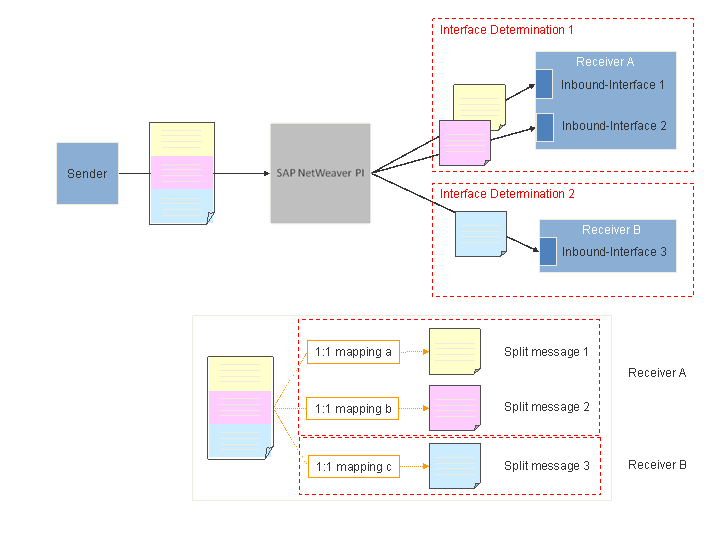
Configuring a Message Split with Different Receiver Systems