 Example Network Topology Using an SAProuter
The following figure shows an example SAP system network topology that uses a router or packet filter with an accordingly configured SAProuter to separate the SAP system server LAN from the front end LAN. We suggest using this setup or a similar setup for productive and other security-critical SAP systems.
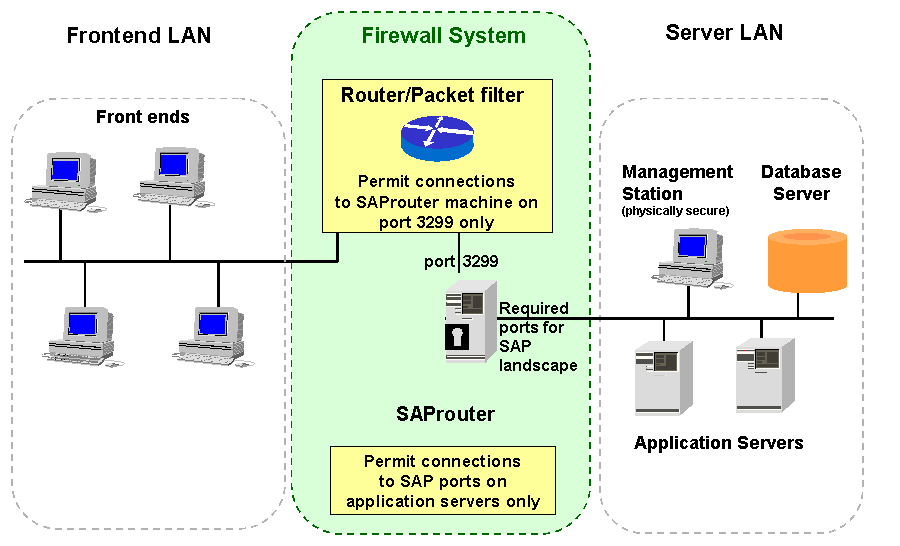
Recommended SAP System Network Topology
The main security elements of this configuration are the router or packet filter and the machine running the SAProuter proxy. The router or packet filter is configured to allow only TCP connections from machines in the frontend LAN to the port 3299 (the default SAProuter port) on the SAProuter machine. The SAProuter is configured to explicitly allow or deny connections from a defined subset of client machines.
Using this setup, machines in the “open” frontend LAN cannot directly access the application or database servers. All front ends connect to a single port on the machine running the SAProuter software. The SAProuter machine opens a separate connection to one of the application servers. The following figure illustrates this two-way connection.
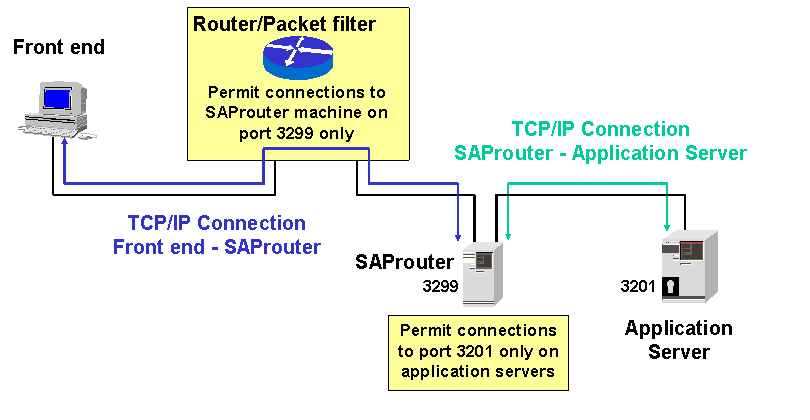
Two-Way Connection Using the SAProuter and a Router/Packet Filter