
 Search Strategy

Use
The search strategy specifies the sequence in which Capable-to-Match planning (CTM) consumes receipts and supplies, and creates new orders.
Features
The search strategy is oriented firstly to an internal system sequence that you cannot influence, and secondly to a sequence that you define.
The system always uses the search strategy locally for a location product. When covering a requirement for a specific location product, the receipts and supplies for other location products are irrelevant. The system also uses the search strategy locally for a location product when covering a dependent requirement.
Internal System Sequence
If you do not enter a search strategy, or enter a strategy where you have not entered any supply categories, the system uses the internal search strategy as follows:
Sequence |
Category |
System Behavior |
1 |
00 |
Consume receipts and supplies from the predefined standard category |
2 |
00 |
Replace receipts and supplies from standard category 00. |
3 |
|
Determine source of supply and create purchase requisition |
To do this, the system first searches for receipts and supplies from the predefined standard category 00. During supply categorization, the system assigned all receipts and supplies to standard category 00, which you had not previously assigned to a supply category. If no receipt exists from the standard category 00 for the (original) location product, the system evaluates existing rules. The system can only substitute receipts from standard category 00.
If the system does not find any receipts from standard category 00, or if the receipt found cannot be used in time to cover the requirement, CTM planning uses the procurement type of the location product to perform source of supply determination. If there are no sources of supply for the location product, in the case of external procurement CTM creates a purchase requisition.
User-Defined Sequence
In the search strategy, you can define the sequence in which CTM planning should use receipts and supplies to cover requirements. You must have defined supply categories that you then enter in the search strategy in your desired sequence.

CTM planning can only use receipts and supplies from supply categories that are contained in the search strategy. The system can always use receipts and supplies from standard category 00.
Example: (the steps highlighted in bold are user-defined)
Sequence |
Category |
System Behavior |
1 |
00 |
Consume receipts and supplies from the predefined standard category |
2 |
01 |
Consume receipts and supplies from supply category 01 |
3 |
00 |
Replace receipts and supplies from standard category 00. |
4 |
01 |
Subsitute receipts and supplies from supply category 01 |
5 |
|
Determine source of supply and create purchase requisition |
6 |
02 |
Consume receipts and supplies from supply category 02 |
If you use rules in
CTM planning, the substitutions are made immediately before sources of
supply are determined. The system processes receipts and supplies for the
substitute product in the same sequence as the receipts and supplies of the
original product, in other words before planned orders or stock transfers are
generated. In the case of a
 Down Binning
Scenario , the system evaluates the substitutions together with the source
of supply determination.
Down Binning
Scenario , the system evaluates the substitutions together with the source
of supply determination.
The system assigns receipts generated by the system during planning, but which are not totally used to immediately fulfill a requirement (for example, when using lot sizes or co-products), to a supply category. If you do not enter a supply category for these receipts, the system assigns the receipts to the standard category 00. The system also uses the search strategy accordingly for these receipts.
Activities
You specify the search strategy in the CTM profile under Edit → Search Strategy, and save it under a name. You enter the name of the search strategy in the CTM profile on the Supplies tab page.
Example
The following example clarifies the local usage of the search strategy:
You have a requirement for location L and can procure the relevant receipt from location L1 or location L2. The transportation lane between location L and location L1 has the higher priority. In location L1 there is a supply with supply category 02, in location L2 there is a supply with supply category 01.
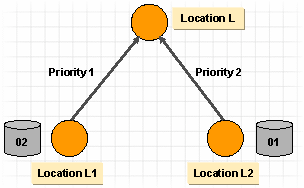
In the system, you have defined the following search strategy:
Sequence |
Category |
Supply Category Description |
1 |
01 |
Supply category 01 |
2 |
02 |
Supply category 02 |
3 |
*** |
*** Source of supply determination *** |
In this example, CTM planning uses the search strategy first at location L. Since there are no receipts or supplies in location L, the system determines sources of supply. Due to the transportation lane priorities, the system chooses location L1. CTM planning uses the search strategy locally for location L1. The system uses the existing supply with supply category 02, even though location L2 has a supply with supply category 01.
If you do not enter priorities for the transportation lanes, you have no influence on the selection of the location. The system does not consider supply categories in the individual locations when determining sources of supply.