 Requirements Strategy
Determines how production quantities are planned in SAP APO and how the forecast is consumed by other orders.
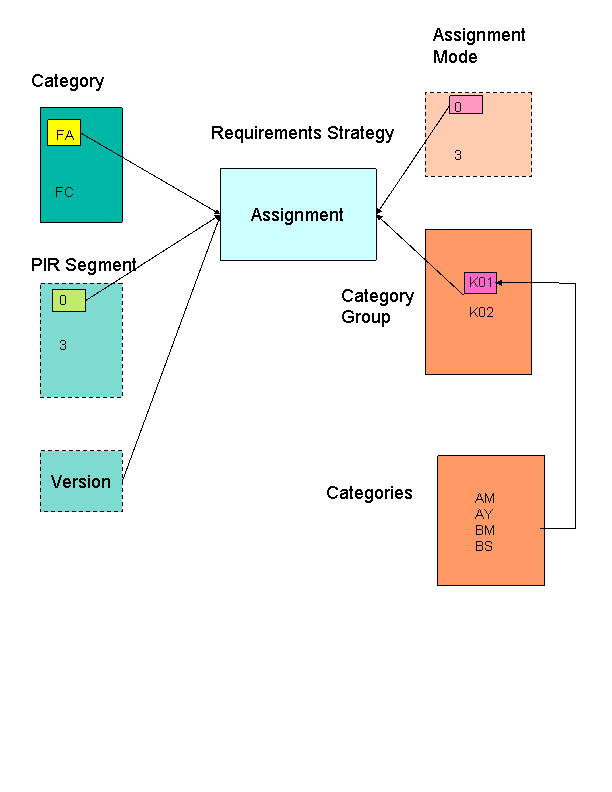
Basically, the requirements strategy assigns an (ATP) category for the forecast (such as FA or FC) to an (ATP) category group that can consume the forecast. The category group can consist of one or more categories. Therefore, in the above example, forecast order category FA can be consumed by the following:
Reservations (AM)
Dependent demand (AY)
Sales orders (BM)
Customer requirements (BS)
Planned Independent Requirements (PIR) Segment
In SAP APO, the quantities for make-to-order production are, in general, planned separately from those for make-to-stock production. These areas are known as PIR segments.
In general, you can only plan within a PIR segment. This means that you cannot consume planned independent requirements for a make-to-stock scenario with sales orders in a make-to-order scenario.
However, SAP does offer a special segment to cover exactly this situation - PIR segment Planning without final assembly, without individual requirements. For more information, see the F1 Help for the PIR Segment field in the requirements strategy.
 Note
Note
Supply Network Planning (SNP) cannot work with the individual customer segment. For example, demand in this segment is not shown in SNP. Consequently, you should not use requirements strategies that use this segment. In the standard system, these are the strategies 30 and 40.
Assignment mode
The assignment mode determines how sales orders consume the forecast, and whether final assembly is taken into account. It is the same as the assignment indicator in the ERP system. This indicator is assigned to the sales order via the demand class. Both fields must have the same value for consumption to take place. For more information, see the SAP Library for SAP ERP Central Component in the component Program Planning (PP-MP-DEM) under Determination of Requirements Type on SAP Help Portal under http://help.sap.com.
Note
The requirements strategy corresponds to the planning strategy in the ERP system. However, the functionality is simpler than in the ERP System.
Requirements Strategy
SAP provides the following strategies in the standard system:
Make-to-stock (strategy 10)
Forecasting with assembly (strategy 20)
Forecasting without assembly (strategey 30)
Forecasting without assembly for configurable products (strategy 35)
Planning product (strategy 40)
If these are not sufficient for your needs, you can create your own requirements strategies in Customizing for Master Data under  Product
  Define Requirements Strategies
  .
.
To enter a requirements strategy for a product, on the SAP Easy Access screen, choose Master Data Product. On the Requirements tab, enter the requirements strategy in the Default strategy field. If the forecast is to be consumed, you must specify a requirements strategy.
You can specify the consumption mode and the length of the relevant consumption period in the Consumption section on the same tab. However, if you do not, the system consumes any independent requirements that lie within the same planning bucket as the sales order.