
 Repetitive Manufacturing with the PPM or the
PDS
Repetitive Manufacturing with the PPM or the
PDS

Purpose
In this process, you use an R/3 System along with the APO system. You use Repetitive Manufacturing with the Production Process Model (PPM)or the Production Data Structure (PDS) if you are a pure make-to-stock manufacturer and produce large quantities of the same product using the same production process in unlimited lots. This means production is planned and executed with no reference to the sales order. The planned independent requirements are created in Demand Management in the R/3 System or in Demand Planning in APO (APO Demand Planning). Incoming sales orders are delivered from warehouse stock and the sales order quantities consume the planned independent requirements quantities according to the selected planning strategy. Planning is based on these two requirements (sales order quantities and planned independent requirements).
APO is purely used as a planning tool and production control, inventory management and cost accounting are executed in the R/3 System.
If you use this kind of Repetitive Manufacturing, create the production master data (routing, material BOM and production version) in the R/3 System. You transfer this master data to APO. APO then uses this data to create either a Production Process Model or a Production Data Structure. You then use this same master data for planning in APO. Here, lead time scheduling is carried out.
You can use this planning process if you use APO along with an SAP R/3 System or a Discrete Industries System.
The disadvantages of using a PPM are listed below:
· You cannot plan any configurable products.
· When planning, APO does not take the various change statuses of the master data into account which you maintain in R/3 using engineering change management.
· When backflushing, you cannot carry out a reporting point backflush.
When using a PDS, you cannot execute a backflush with reporting points. However, you can plan configurable products and you can also use the engineering change management.
Prerequisites
·
In the R/3 System and in APO, you must maintain the
technical settings required to create the basis for setting up the interface
between the two systems. You can find the individual steps from
the document
 Checklist for Setting
Up the System Landscape. For more information, refer to the
documentation
Integration of APO and
R/3.
Checklist for Setting
Up the System Landscape. For more information, refer to the
documentation
Integration of APO and
R/3.
Process Flow
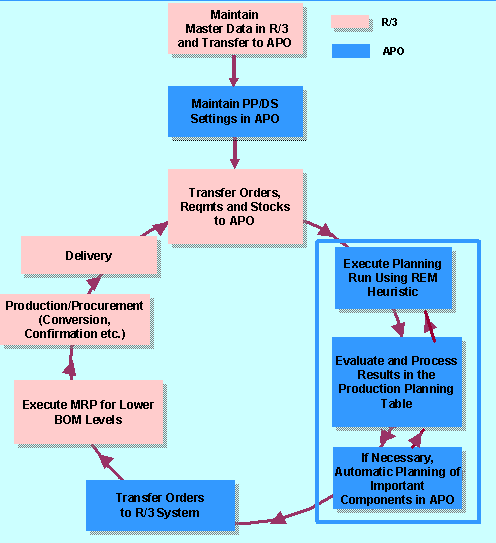
The following diagram shows the planning process in Repetitive Manufacturing using the production process model:
...
1. Create the master data you require for Repetitive Manufacturing in the R/3 System.
2. Transfer the master data relevant to planning to APO using the APO Core Interface.
3. Depending on the settings in the integration model, either a PPM or a PDS is created for the product to be planned in the SAP System. Check and complete the transferred master data in APO. Maintain the PP/DS settings in APO, such as the factory calendar, propagation range, and so on.
4. Transfer the necessary transaction data (for example, sales orders, planned independent requirements, receipt elements) to create a consistent planning situation between the two systems.
5. Carry out a planning run in APO – with the REM Heuristics, for example. Two heuristics are provided specifically for repetitive manufacturers. Both heuristics create APO planned orders for the existing requirements while taking the available capacity of the resources into account per period. If necessary, you can also define further heuristics for planning the lower BOM levels meaning that you can plan all BOM levels in one planning run. However, planning is only executed for the components which you have defined to be further planned in APO.In this case, APO also creates suitable planned orders for the dependent requirements.
You can also plan the lower BOM levels in a separate planning run.

In APO, you should only plan components to be planned using MRP. All components planned using consumption-based planning methods are planned in the R/3 System. You can also plan externally procured components in APO. This makes sense, for example, if you have to take the capacity of your vendor into account when planning. The component Collaborative Procurement is provided to support external procurement activities.
6. Check and process the planning results in the product planning table. Here, you can change or reschedule the planned orders created in APO, for example. If necessary, restart the planning run to update the planning results.
7. The APO planned orders are transferred to the R/3 System.

Every change to a planned order is automatically passed on to the R/3 System.
8. Execute the planning run for the components to be planned in the R/3 System. Here, the system creates suitable procurement proposals for the dependent requirements.
9. The production/procurement of the product and its components is carried out using the R/3 System, that is, you carry out the conversion of the planned orders and purchase requisitions, material staging, backflushes and the posting of the goods receipts and goods issues in the R/3 System.