
 Supporting Functions in Project
Manufacturing
Supporting Functions in Project
Manufacturing

Features
You can use the following functions to support the process:
· Earliest and latest start and end dates of operations within an order
These dates/times are display in the detailed scheduling planning board in the detail data of operations of an order, and in order processing.
These dates are only determined and displayed if you select the indicator Display Earliest/Latest Operation Dates, which you can find in Customizing for Supply Chain Planning, under Production Planning and Detailed Scheduling (PP/DS) → Global Settings → Maintain Global Parameters and Defaults.
The following graphic illustrates how the system calculates the activity dates of the order, taking into account the preceding and succeeding orders that are linked the order via pegging relationships. The system treats preceding and succeeding orders as fixed.

· Visualization of Relationships in the Detailed Scheduling Planning Board
In the planning board profile, you can define that relationships and pegging relationships are visually highlighted in the following planning situations:
¡ The net interval of the relationship falls below the planning-related minimum interval.
¡ The requirement at pegging relationships lies before the receipt (taking into account the maturation time)
If the net interval of the relationship falls below the planning-related minimum interval, the relationship is displayed with a lighter and thicker blue line.
The graphic illustrates how relationships are visualized in the detailed scheduling planning board.
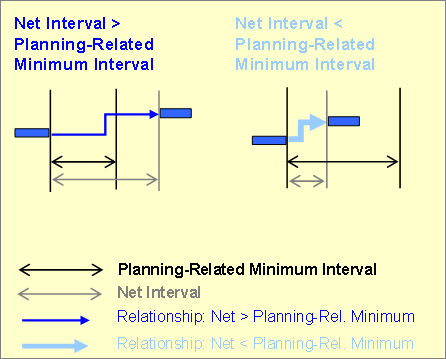
You make settings for the planning board profile in Customizing for Supply Chain Planning under Production Planning and Detailed Scheduling (PP/DS) → Detailed Scheduling → Settings for the Detailed Scheduling Planning Board → Maintain Planning Board Profiles. Choose Further Settings and select Plan. Min. Int.
· Details about the Resource Utilization List
In the detail view for resource utilization in the resource utilization list, you can also see details about capacity requirements. You can see which proportion of the capacity requirements is made up by planned orders, production orders and so on. This information is also grouped according to order priority, status of the activity, and order type.
See
 Displaying the
Resource Utilization List
Displaying the
Resource Utilization List
· Hierarchical selection of orders in the detailed scheduling planning board
In the network, you can select by hierarchy.
You can select preceding and succeeding orders individually, or select all preceding and/or succeeding orders that are linked to the order via pegging relationships.
You can use the following functions:
¡
 Select all preceding orders
¡
 Select all directly preceding
orders
Select all directly preceding
orders
¡
 Select all objects of the
order
Select all objects of the
order
¡
 Select all directly succeeding
orders
Select all directly succeeding
orders
¡
 Select all succeeding orders
· Heuristics for project manufacturing and make-to-order manufacturing
See
Heuristics and
Detailed
Scheduling Planning Heuristics
· Displaying Network Alerts for Project Orders at Operation Level
For project orders only, you can see network alerts at operation level in the order view, and not, as before, at order level.