Decomposition

Use
If you have selected many activities for optimization, the system can use decomposition to divide up the optimization range into several smaller ranges for which optimization can find a solution more quickly. The system optimizes the overall problem based on these partial solutions. On the one hand, this improves performance, and on the other hand, the system can more easily find a solution.
Prerequisites
You must have made the settings for decomposition, in the optimization profile, on the Additional Strategies tab page.
Features
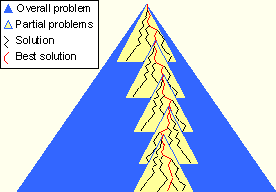
As soon as the overall problem for optimization exceeds the number of activities defined in the optimization profile, the system divides up the problem into smaller intervals (ranges) containing a number of activities that is also defined in the optimization profile. These activities overlap each other.
Optimization solves the partial problems in their time sequence and groups together the partial solutions that have been found in an overall solution.
Example of the procedure for optimization with decomposition