Pegging Horizon

Definition
Period in which the system is to create or delete fixed pegging relationships.
The system determines this period on the basis of the number of days that you have specified.
The requirement and receipt elements for which the system is to create or delete a fixed pegging relationship must lie within the pegging horizon. In other words, the requirement date for a requirement element and the availability date for a receipt element must lie within the horizon. If this is not the case, the system is unable to create or delete a fixed pegging relationship between the two elements.
Use
· You can define the end of the horizon in the settings of the heuristic SAP_PP_019, which is used to create fixed pegging relationships. The start of the horizon then lies at an unspecified point in the past. To determine the end of the pegging horizon, the system adds the number of days specified to today's date (and time).
· You can define the start of the horizon in the settings of the heuristic SAP_PP_011, which is used to delete fixed pegging relationships. To determine the start of the pegging horizon, the system adds the number of days specified to today's date (and time).
The end of the horizon then lies at an unspecified point in the future.
Structure
You can define how the system determines the end (for the heuristic settings for creating fixed pegging relationships) or the start of the horizon (for the heuristic settings for the deletion of fixed pegging relationships). The following options are available:
· No limit
If you choose this setting, the horizon extends from the past to the future, without any defined start or end date.
· User-defined
If you choose this setting, you can specify a number of days. The system then determines the start/end of the horizon by adding the number of days you have entered to today's date (and time), without taking the factory calendar into account.
· PP/DS horizon
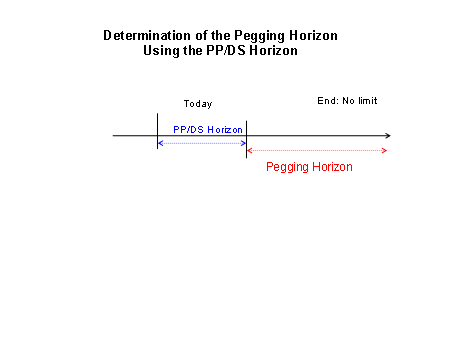
If you choose this settings, the system uses the number of days of the PP/DS horizon and adds this number of calendar days to today's date (and time).
· Planned delivery time
If you choose this setting, the system uses the number of days of the planned delivery time that you have entered in the product master and adds this number of days to today's date (and time) without taking the factory calendar into account. Data that you have modeled for vendors, such as a transportation lane, is not taken into account.
· ATP checking horizon
The system uses the number of days entered in the product master for this setting. If you have also specified a calendar for the checking horizon in the product master, the system also takes into account the non-working days specified in the calendar when it calculates the start of the horizon.
· PP/DS planning time fence
For this setting, the system uses the number of days that you have maintained in the product master and the non-working days that you have specified in the production calendar for the location.
Integration
If the system is unable to determine a horizon start or end because you have not entered a value for the horizon in the product master, the system cannot delete or create the fixed pegging relationships.
Example
Pegging Horizon when Creating Fixed Pegging
The following graphic illustrates the pegging horizon if you define the PP/DS horizon as the end of the pegging horizon, for example.

Pegging Horizon when Deleting Fixed Pegging Relationships