 Transaction Handling
All operations provided by the Business Process Management (BPM) Application Programming Interface (API) require a transactional context in which the execution takes place. The Application Server Java (AS Java) provides transaction handling support with the implementation of the Java Transaction API (JTA). Typically, the BPM API is called from an EJB or a servlet (JSP or JSF, respectively). In both cases you can easily set up a transactional context. By default, both variants provide Container Managed Transaction Demarcations. For more information, see Specifying Transaction Attributes.
If the caller of an operation of the BPM API runs in a transaction, the operation that is called will reuse this transaction. If the caller does not run in any transactional context, the operation creates a new transaction.
Transactional Boundaries
The following examples show how different transactional boundaries impact the visibility of operation results. They show a stateless session bean with two different methods. Both methods perform a claim operation followed by a start operation. The task status changes from READY to IN_PROGRESS.
 Example
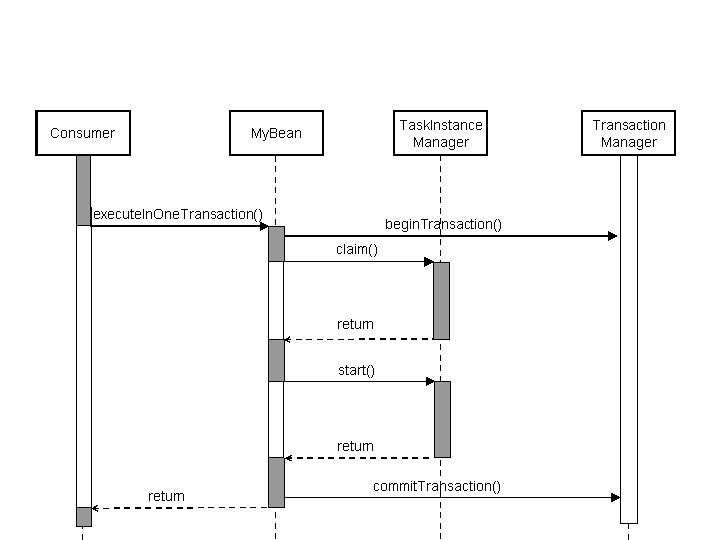
In this example, the method executeInOneTransaction is annotated with the transaction attribute REQUIRES_NEW. The transaction of this method is reused when performing the claim and start operation. The two operations, claim and start, are performed in one transaction. The status change initiated by the claim operation is not visible outside the transaction. The status change by the start operation is made visible.
 Note
Note
If the transaction gets rolled back due to an exception, no changes are persisted. The task remains in its original status READY.
 Syntax
@Stateless
public class MyBean implements My {
    …
    @TransactionAttribute(value=TransactionAttributeType.REQUIRES_NEW)
    public void executeInOneTransaction() throws BPMException {
      TaskInstanceManager mgr = ...;
      URI taskUri = ...;
     	mgr.claim(task.getId());
    	mgr.start(task.getId());
    }
Example
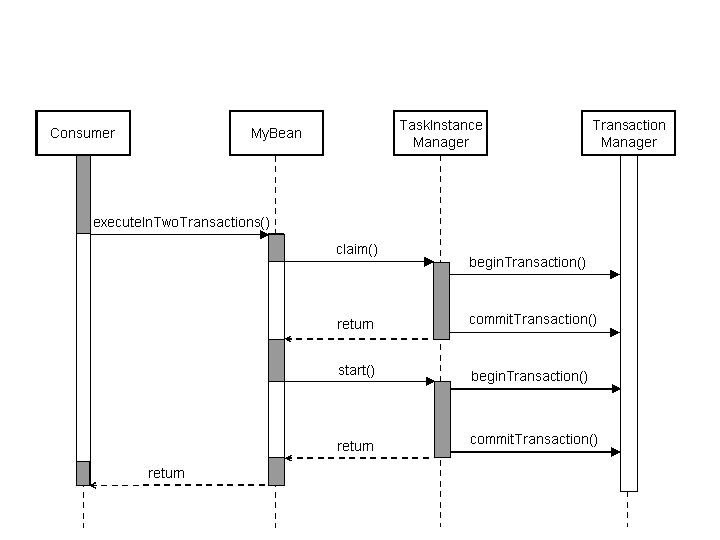
In this example, method executeInTwoTransactions is used. This means that the claim and the start operation are performed in separate transactions.
Syntax
    @TransactionAttribute(value=TransactionAttributeType.NEVER)
    public void executeInTwoTransactions() throws BPMException {
      TaskInstanceManager mgr = ...;
      URI taskUri = ...;
     	mgr.claim(task.getId());
    	mgr.start(task.getId());
    }
}
Bean-Managed Transaction Demarcations
The caller can manage the transaction boundaries on their own using user transactions. In particular, this is used if the caller runs without transactional context that could be reused.
More information: Specifying Transaction Attributes
Example
This example shows how to create a user transaction that executes a claim and start operation in a single transaction. When committing the transaction, the task status changes from READY to IN_PROGRESS. If the transaction gets rolled back for any reason, the task will remain in the READY status. The task remains in the READY status even if the claim operation does not encounter any issues.
Semantically, the following example is identical with the first example using the executeInOneTransaction method.
Syntax
TaskInstanceManager mgr = …
URI taskUri = …
UserTransaction ut = (UserTransaction)ctx.lookup("java:comp/UserTransaction");
ut.begin();
try {
  mgr.claim(taskUri);
  mgr.start(taskUri);
  ut.commit();
}catch(Exception e) {
  …
  ut.rollback();
}