 Integrated Configuration
You find the Web service description for an integrated configuration in the data types below. You find the data types in the Integrated Configuration folder.
Data Type |
Description |
MessageHeaderID (in Common folder) |
Specifies object key. The same data structure is used for the object key for receiver determinations, interface determinations, sender agreements, receiver agreements, integrated configurations, and direct connections. For more information, see Receiver Determination |
IntegratedConfiguration (or RestrictedIntegratedConfiguration) |
Defines the integrated configuration with all attributes.
|
InboundProcessing |
Defines attributes for the inbound processing of the message. The data type consists of the following elements:
|
Receivers |
Defines attributes for determining receiver components. The data type consists of the following elements:
Specify this parameter when you have entered the value Specified Receiver for the element NoReceiverBehaviour. If you have entered the valuesIgnore orError Message for the Element NoReceiverBehaviour then the element NoReceiverReceiver is ignored. |
OutboundProcessing |
Defines attributes for the outbound processing of the message. Note the following notes for the selected elements:
|
IntegratedConfigurationReceiverRule |
Specifies the routing rule for an Integrated Configuration with standard receiver determination. The rule contains the following elements:
|
ReceiverDeterminationMapping |
Specifies the routing rule for an Integrated Configuration with extended receiver determination. The routing rule consists of the following elements:
For more information on the parameterized mapping programs, see the Process Integration overview documentation on the SAP Help Portal under |
IntegratedConfigurationReceiverInterfaceRule |
Defines attributes for determining the receiver interfaces and mappings. The rule contains the following elements:
LeftExtractor/RightExtractor:Specifies the expression for left/right operand. More information, see Structuring Conditions below and the description of the Extractor element.
Use this parameter to specify the receiver interface. |
Extractor |
Describes the data structure for the entry of an expression in a condition. An expression consists of the following elements:
|
 SAP NetWeaver Process Integration
  Special Development Tasks
Structuring Conditions
The core of a condition is the connection of an expression (Extractor) with another expression by using an operator. In an elementary condition (AtomicCondition), you connect exactly two expressions together, a left expression and a right expression (LeftExtractor/RightExtractor).
You can connect elementary conditions to blocks (AtomicConditionBlock) using the AND operator. You can then connect this to a condition using the OR operator.
The figure shows how complex conditions are fundamentally set up when they are made up of several blocks of elementary conditions.
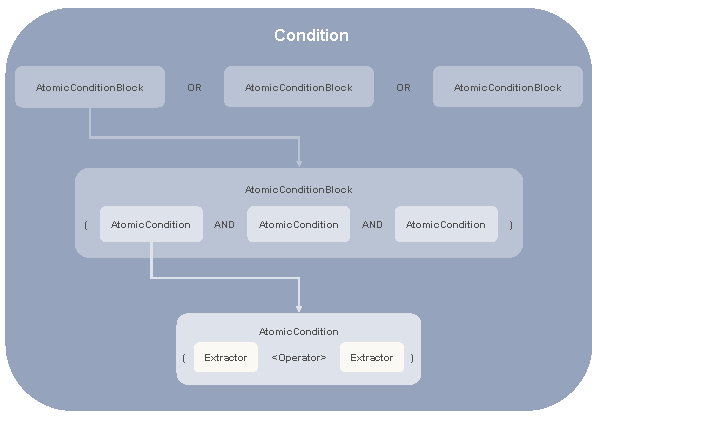
Structuring Conditions
Structuring Expressions
You have several options for formulating an elementary condition in an expression.
 Note
Note
Using TypeID element you specify how you want to define the expression.
Expression Type |
Description |
|---|---|
Entering a constant (TypeID = Constant) |
Enter the value in the Value parameter. |
Entering an XPath expression (TypeID = XPath) |
Enter the XPath expression in the Value parameter. |
Entering a Context Object (TypeID = Context Object) |
Enter the name and namespace of the (technical) context object or the header field from the ES Repository in the ContextObjectName and ContextObjectNamespace parameters. |
Entering a Technical Context Object (TypeID = Technical Context Object) |
|
Entering a field from the message header (TypeID = Message Header Field) |
Example of a Condition
If the AirlineID field in the message payload has the value LH, then the message is forwarded to the receiver business system BUS_100. A context object of the same name from the ES Repository is used to access the AirlineID field in the message.
The receiver determination (in the dual stack) or integrated configuration contains just one block with an elementary condition (AtomicCondition) and the assignment to the receiver.
The elementary condition is expressed using the following elements (XML presentation).
 Syntax
<AtomicCondition>
<Operator>EQ</Operator>
<LeftExtractor>
<TypeID>Context Object</TypeID>
<Value>/p1:BookingOrderRequest/FlightID/AirlineID</Value>
<Datatype></Datatype>
<ContextObjectName>AirlineID</ContextObjectName>
<ContextObjectNamespace>http://sap.com/xi/XI/Demo/Agency
</ContextObjectNamespace>
</LeftExtractor>
<RightExtractor>
<TypeID>Constant</TypeID>
<Value>LH</Value>
<Datatype>xsd:string</Datatype>
<ContextObjectName>
</ContextObjectName>
<ContextObjectNamespace>
</ContextObjectNamespace>
</RightExtractor>
</AtomicCondition>
Example of Expressions
Entering a Field from the Message Header
Syntax
<TypeID>Message Header Field</TypeID>
<Value></Value>
<Datatype>xsd:string</Datatype>
<ContextObjectName>SenderPartyAgency</ContextObjectName>
<ContextObjectNamespace>http://sap.com/xi/XI/System</ContextObjectNamespace>
Entering a Technical Context Object
Syntax
<TypeID>Technical Context Object</TypeID>
<Value></Value>
<Datatype>xsd:string</Datatype>
<ContextObjectName>ProcessStep</ContextObjectName>
<ContextObjectNamespace>http://sap.com/xi/XI/System</ContextObjectNamespace>
Entering a Context Object
Syntax
<TypeID>Context Object</TypeID>
<Value></Value>
<Datatype>xsd:string</Datatype>
<ContextObjectName>ConvContent</ContextObjectName>
<ContextObjectNamespace>http://xi.com/gr/conv</ContextObjectNamespace>