 Evaluation in the Rule Set
Use
The evaluation of the rule set determines how SAP Event Management (SAP EM)reacts to incoming event messages.
You need this function to check how incoming event messages are processed for your supply chain event management-relevant (SCEM-relevant) processes in SAP EM, and to specify how SAP EM reacts to event messages. For example, you can specify that an e-mail is sent to the person responsible in the case of a delay to a shipment.
You specify how SAP EM reacts to event messages by defining:
Conditions for the rule activities
Rule activities with their tasks

For example, you can define as tasks that an e-mail is sent to an employee, or that application object data is updated, or that the status of event handler is changed.
Prerequisites
You have defined a rule set for each event handler type.
You have defined rules with their activities and conditions within the rule set.
Features
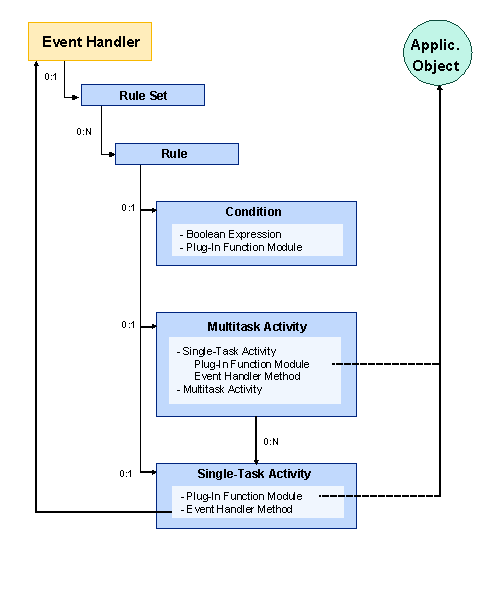
A rule set consists of a set of rules that SAP EM evaluates one after the other when an event message is processed.
Each rule can contain activities and a condition. Depending on whether the evaluation of the individual condition returns the result “TRUE” or “FALSE”, SAP EM continues to process the event message with the respective activity, assuming that you have previously defined this activity.
A condition can also consist of a condition set.
You use the logical connection between the individual rule conditions (AND or OR relation) to define how rule processing occurs.
Each multitask activity consists of a sequence of tasks that SAP EM executes one after the other.
The following are examples of activities in SAP EM:
Single-task activity
A single-task activity is a plug-in function module or a method.
You can use the plug-in function modules that SAP delivers with SAP EM or you can define your own. The plug-in function module can refer to event handlers or other objects (for example, sending an e-mail or updating the status of a means of transport) in SAP EM, or can call a BAPI in a remote system to update the business object data.
You can choose from only those methods delivered with the SAP EM Class Library and cannot define your own without modifying them.
Use your own plug-in function modules for activities.
The method reads or updates the event handler’s internal data (for example, activation or deactivation of an event handler, update to event handler data, check of individual values for the event handler’s expected events, such as the date or sequence).
Multitask activity
Amultitask activity can consist of one or more plug-in function modules, methods, or multitask activities.
The following figure provides an overview of a rule set structure:
Activities
Rule evaluation within a rule set for an incoming event message
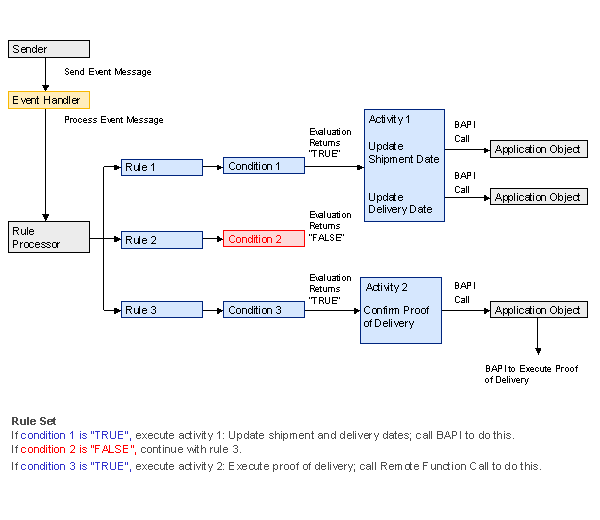
The event handler controller forwards the incoming event message to the rule processor that applies the corresponding rule set.
SAP EM evaluates the condition for each rule that is applied and calls the individual activity depending on the result of this evaluation.

SAP delivers rule activities that you can use within a rule set.
SAP EM processes the respective tasks for each activity. These tasks can, for example, call a BAPI to update data in the application system.
The evaluation of rule condition 1 returns “TRUE” and SAP EM executes activity 1 . Activity 1 consists of two activity steps: Update the shipment date and delivery date of the corresponding application object in the application system using the respective BAPI call. Processing then continues with rule 2 .
The evaluation of rule 2 returns the result “FALSE”. SAP EM does not execute an activity and processing continues with rule 3 .
The evaluation of rule condition 3 returns “TRUE” and SAP EM executes activity 3 . Activity 3 consists of a task: proof of delivery. SAP EM calls a BAPI to process the proof of delivery in the application system.
After SAP EM has evaluated all the rules one after another, the application system sends a confirmation to SAP EM so that SAP EM saves the updated event handler data.
The following figure provides an overview of the evaluation in the rule set:
Example
You create a shipment document in SAP R/3, for example. You have specified that your shipment is SCEM-relevant so that SAP EM creates an event handler for your shipment document. The event messages for the shipment start and shipment end go to SAP EM. SAP EM calls a rule for these event messages from the rule set belonging to the event handler. This rule executes an activity. This activity contains the task that calls a BAPI to update the date or the stages of your shipment in the application system.