Creating a Project
To create a new service using SAP NetWeaver Gateway
Service Builder, you first need to create a project. Service Builder projects bundle all
the artifacts you need to develop a service in one central place helping you organize the
service development and modeling process.
Process
- Launch SAP NetWeaver Gateway Service Builder in transaction SEGW.
- Click Create.
- In the Create Project dialog box, enter a unique name for your new project. The project name must not exceed 30 characters and must not start with a number or include any special characters (underscores are permitted). For example, DOCUMENTATION_TEST.
- Enter a short description for your new project. You must enter a short description otherwise you cannot create the new project. The description must not exceed 60 characters. The short description should provide additional context information about your project. The short description you define here is displayed in the Service Builder together with the project name.
- Under Attributes, click project type Service with SAP Annotations to enable you to use standard annotations (such as, creatable, updatable) to specify how data model artifacts are to be used.
- Under Attributes use the input help to select Standard as the generation strategy to be used.
- Enter the name of the package in which the project is to be created or choose Local Object if you want to create the project locally.
- Click Enter to create your new project together with its unique name and description in the location you specified.
Result
The Service Builder creates a
new project structure, which you can use to develop or generate your new service.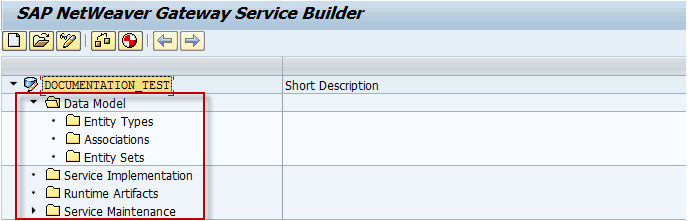
Note To prevent loss of data,
you must save your newly created project. A confirmation message is displayed at the
bottom of the screen after the project has been created. The next time you launch SAP NetWeaver Gateway Service Builder, you can continue working on this project by clicking
Open. In the Open Project dialog box,
enter the name of your saved project and click
Execute.