 Displaying a Network
Use
You display a document flow network to be able to monitor and evaluate your processes. The document flow displays the dependencies between your business objects (predecessor document and successor document) and specifies the attributes.
Integration
SAP Event Management ( SAP EM ) works with one local document flow only.
Prerequisites
You have set the Document Flow indicator in the user profile in Customizing. As a result, the Web interface (classic) automatically displays the link to the document flow network that belongs in the event handler list .
For more information, see the Implementation Guide (IMG) for SAP EM under
 Event Management
  Event Messages, Status Queries
  ,
and Web Interface Web Interface Define User Profiles
.
,
and Web Interface Web Interface Define User Profiles
.
In the Web interface (classic), you have defined your personal settings for displaying a document flow network.
You have not set the Accessibility Switch under Settings . This means that you can choose between a graphical or tabular display of the network in the Web interface (classic).
You have set the Accessibility Switch under Settings . This means that the system displays a tabular view of the network in the Web interface (classic) that your screen reader can read.
You have chosen the Document Flow Mode under Settings . SAP EM firstdisplays the mode that you choose here ( graphicalor tabular)in the Web interface (classic). The Web interface (classic) also displays a link with which you can select the other mode.
In the standard system, the graphical view is delivered as the document flow mode for the Web interface (classic). You can change this setting in the personal settings in the Web interface (classic).
Features
If an event handler exists and you have read authorization for the nodes of this event handler, the Web interface (classic) displays the following information:
The document category, document number and, as appropriate, the document item number with an active link to the event handler that has generated them. If you have the appropriate authorizations in your user profile, the Web interface (classic) displays detailed information, and you can execute a drilldown.
The relevant parameters, for example, status information or info parameters
 Note
NoteFor more information, see Web Interface (Classic) and the IMG for SAP EM under
Event Management Event Messages, Status Queries, and Web Interface Web Interface
Define User Profiles
.
End of the note.
Activities
The following figure provides an overview of the activities for displaying a document flow:
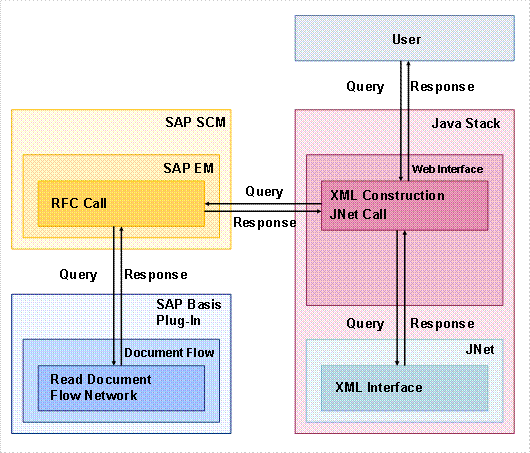
You select one event handler in the Web interface (classic).
The Web interface (classic) calls SAP EM and displays the event handler.
You want to see the hierarchy for this event handler and choose Document Flow .
The Web interface (classic) calls SAP EM. SAP EM calls methods in the document flow to read the network.
The document flow sends the relevant network data to SAP EM.
SAP EM sends this data via RFC to the Web interface (classic).
The Web interface (classic) creates XML files from this data and sends the XML files to JNet.
JNet sends corresponding GIF files containing this data to the Web interface (classic).
The Web interface (classic) displays the document flow network in a new dialog box.
If you want to use additional attributes in the document flow, you have defined them in Customizing.
For more information, see the IMG for SAP EM under
Event Management Interface to Document Flow Define Document Flow Groups
.