
 Extensions for Room Templates and Room Part
Templates
Extensions for Room Templates and Room Part
Templates

An extension for room templates or room part templates is a program that controls the storing and obtaining of data for rooms or room parts. For example, you can use extensions in a template to define the following items:
● Folders in your content management backend system, in which the system stores the data for rooms
● Folders from third-party backend systems, in which the system stores the data for rooms
● Obtaining or linking information
SAP delivers standard extensions. You can develop company-specific extensions.
Executing an Extension in the Lifecycle of a Room
The standard extension delivered by SAP for rooms defines which activities the system executes at particular points in the lifecycle of a room, for example, on the basis of the extension configuration, the system creates a folder in the CM backend system when creating a room. The extension points are defined by SAP (see below).
You configure the required extensions in the room templates and room part templates. Configuring an extension means that you define the necessary input and output parameters for each extension point that is provided in the extension.

The system passes on some parameter values, for example, the room folder, so that you do not need to define the corresponding parameters for the subsequent extension points.
The graphic below uses an example to illustrate how the system executes extensions at certain extension points in the lifecycle of a room.
...
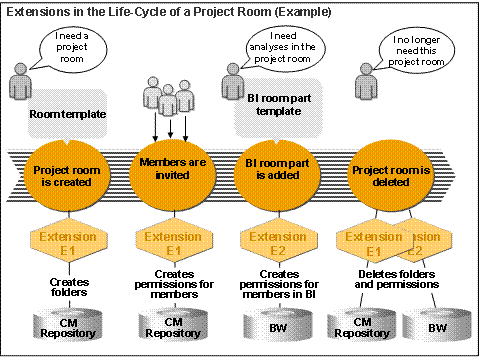
Time |
Activity |
Creating the room |
Extension E1 creates folders for the room data. |
Inviting the room members |
Extension E1 assigns the members access permission to the folder. |
Adding a new room part with analysis functions from SAP BI |
Extension E2 creates the required permissions in the BI backend system.
|
Deleting the room |
Extension E1 deletes all folders and permissions created. |
SAP Standard Extensions
Name |
Description |
CM Room Extension (cmRoomExtension) |
Controls storage of the data from rooms or room parts in the CM backend system |
CM Discussion Extension (cmDiscussionExtension) |
Sets up permissions for discussion groups |
Extension for Meeting Room Properties (meetingRoomPropertyExtension) |
Controls the addition of specific properties to the meeting room (room template SAP_MEETING_ROOM_EXTENDED) |
SAP Utility Extensions
Name |
Description |
Link Strings (Concat Strings)
|
Links two strings, for example, to form meaningful folder names |
Read Extension for the Configuration (Configuration Reader) |
Reads property values from the configuration of a string |
Read Extension for Room Part Properties (Room Part Property Reader) |
Reads property values of a room part |
Read Extension for Room Properties (Room Property Reader) |
Reads property values of a room
|
Extension Points for Rooms
Extension Point |
Technical Name |
Creating a room |
ON_CREATE_ROOM |
Deleting a room |
ON_DELETE_ROOM |
Extension Points for Room Parts
Extension Point |
Technical Name |
Creating a room part |
ON_CREATE_ROOMPART |
Deleting a room part |
ON_DELETE_ROOMPART |
Extension Points for Rooms and Room Parts
Extension Point |
Technical Name |
Adding a room part to the room |
ON_ADD_ROOMPART_TO_ROOM |
Removing a room part from the room |
ON_REMOVE_ROOMPART_FROM_ROOM |
After creating a room |
ON_AFTER_CREATE_ROOM |
Before deleting a room |
ON_BEFORE_DELETE_ROOM |
When adding a room role to the room |
ON_ADD_ROOMROLE_TO_ROOM |
When deleting a room role from the room |
ON_REMOVE_ROOMROLE_FROM_ROOM |
When adding a user to the room |
ON_ADD_USERS_TO_ROOM |
Removing a user from the room |
ON_REMOVE_USERS_FROM_ROOM |
When assigning a new room role to room members |
ON_ADD_USERS_TO_ROOMROLES |
When removing room role assignments for room members |
ON_REMOVE_USERS_FROM_ROOMROLES |
When changing the room owner |
ON_SET_OWNER_OF_ROOM |
When locking a room |
ON_LOCK_ROOM |
When unlocking a room |
ON_UNLOCK_ROOM |
When hiding a room |
ON_HIDE_ROOM |
When unhiding a room |
ON_UNHIDE_ROOM |
When setting full permissions for the owner |
ON_SET_OWNERFULLACCESS_IN_ROOM |
When revoking full permissions for the owner |
ON_REMOVE_OWNERFULLACCESS_IN_ROOM |
When changing the value of an external parameter for the room |
ON_CHANGE_PARAMETER |
Activating the Extensions
To be able to use extensions for room templates and room part templates, they must be entered and activated in the configuration of rooms. Path in the portal: Content Administration → Collaboration Content (→ Related Topics) → Configure Room Extensions. In the configuration, you specify the associated parameters and permitted values, for example, the permitted storage folders. You define the permitted values in the value set providers.
See also: