 Authorizations
Authorizations control user-access to system data and are therefore a prerequisite for implementing Record and Case Management.
The SAP authorization concept protects transactions and programs in SAP systems using authorization objects. Authorization objects allow complex authorization checks. These checks are subject to a number of conditions. Authorizations depict features of the authorization objects according to the activity and responsibility of the employee. The authorizations are summarized in an authorization profile, which belongs to a role. The administrator assigns the appropriate role to the employee so that they can fulfill their tasks in the system.
SAP delivers authorization objects for Record and Case Management. You can use them to control access to records, cases, documents and incoming post items for organizational units of your organizational structure. SAP delivers ready-made roles that contain the authorizations for the task areas of the employee. These roles also contain the authorization objects for Records Management and Case Management. You can use the roles as templates for your own roles and adjust them to your requirements.
You can find more information on the authorization objects for Records Management and Case Management under Authorization Concept for Records Management, Authorization Concept for Customizing, and Role Maintenance.
Prerequisites
You have familiarized yourself with SAP’s authorization concept.
For more information on general maintenance of authorizations in the SAP system, see Users and Roles (BC-SEC-USR)
You have defined your requirements for the authorization check in your organization and made the appropriate settings in Customizing of Record and Case Management.
You define the organizational levels and objects for the authorization check in Customizing. You can use them to control the authorization check for individual organizational units.
You can find more information in the implementation guide (IMG) of Record and Case Management under Authorizations.
Features
Technical Name |
Description |
SAP_PS_RM_USER |
Processor Record and Case Management |
SAP_PS_RM_REGISTRAR |
Recorder Records and Case Management |
SAP_PS_RM_HEAD |
Manager Records and Case Management |
SAP_PS_RM_ADMINISTRATOR |
Administrator Records and Case Management |
For other roles see, Roles and Authorizations for The National Archives.
Technical Name |
Description |
PS_RMPSGEN |
RMPS: General Activities Using this authorization object, you can control the authorizations for general activities in Records and Case Management that are not dependent on the element type. |
PS_RMPSDIS |
RMPS: Description of Circular Using this authorization object, you can assign the authorizations for executing activities in cases. |
PS_RMPSORG |
RMPS: Access Record, Case, Document Org. Assignment User Using this authorization object, you can control the authorizations for accessing objects according to the organizational assignment of user and object. |
PS_RMPSOEH |
RMPS: Access Record, Case, Document Org. Assignment User Using this authorization, you can control access to the objects for a specific organizational unit. |
You can find more authorization objects under Roles and Authorizations for The National Archives. For more information on the fields of authorization objects, see the documentation on authorization objects.
Activities
The authorization check for the authorization objects PS_RMPSORG and PS_RMPSOEH works in the following way:
The system determines the organizational unit the user is assigned to.
From this organizational unit, the system creates a list of all organizational units that are super-ordinate to the organizational unit determined in the first step.
The system determines the amount (M1) of all organizational objects that are assigned to this organizational unit.
The system determines the organizational unit that is assigned to the object to be processed (corresponds to the initiating organizational unit in the attributes of the object to be processed).
From this initiating organizational unit, the system creates a list of all organizational units that are super-ordinate to the organizational unit determined in the hierarchy.
The system determines the amount (M2) of all organizational objects that are assigned to these organizational units.
The system determines the intersections (from M1 and M2) of the matching organizational objects from users and the object to be processed.
The system determines the organizational levels that match the user and object to be processed.
When a matching organizational level is found, the system executes the authorization check for the other fields of the authorization object (for example type of object or activity).
If the user is allowed to carry out the activity desires, processing is approved. If the user is allowed to carry out the activity desires, processing is approved.
Example
You have an organizational structure comprising 4 hierarchy levels – authority, department, section, and functional area. The authorization concept of your organization stipulates that an employee can only access (process) Records Management objects within their own organizational unit. However, the authorization check should be only be carried out at three levels. Therefore, if a section is subdivided into functional areas, all employees of the section and functional areas should have the same authorization. Departments 2 and 3 work closely together, therefore the employees of department 2 should be able to read all records, cases and documents of department 3 and vice-versa.
You have to define the following settings in Customizing so that you can assign authorizations to employees:
Level |
Organizational Object |
Assignment to Organizational Unit |
Level 1 |
B_MINITOP |
Authority |
Level 2 |
B_AB1 B_AB2 |
Department 1 Department 2, Department 3 |
Level 3 |
B_REF1.1 B_REF1.2 B_REF2.1 B_REF2.2 B_REF2.3 B_REF2.4 B_REF3.1 B_REF3.2 |
Section 1.1 Section 1.2 Section 2.1 Functional Area 1, Functional Area 2 Section 2.2 Section 2.3 Section 2.4 Section 3.1 Section 3.2 |
Assignment of Organizational Object to Organizational Structure
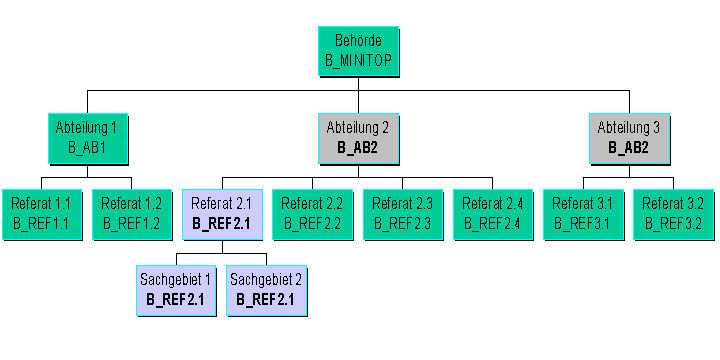
Authorization Check
Mr. Miller is assigned to department 3 and wants to read a document that is assigned to department 2.
The system determines department 3 as the organizational unit the user is assigned to.
From this organizational unit, the system creates a list of all organizational units that are super-ordinate to the organizational unit determined in the hierarchy.
Department 3
Authority
The system determines all organizational objects that are assigned to this organizational unit.
Department 3 <-> B_AB2
Authority <-> B_MINITOP
The system determines department 2 as the organizational unit to which the object to be processed is assigned.
From this organizational unit, the system creates a list of all organizational units that are super-ordinate to the organizational unit determined in the hierarchy.
Department 2
Authority
The system determines all organizational objects that are assigned to this organizational unit.
Department 2 <-> B_AB2
Authority <-> B_MINITOP
The system determines the intersections of the matching organizational objects from users and the object to be processed.
B_AB2
MINITOP
The system determines level 2 as the organizational level that matches for the user and the object to be processed.
Employee Miller
Document to be Processed
Organizational unit
Organizational Object
Organizational Object
Organizational unit
Level 1
Authority
B_MINITOP
B_MINITOP
Authority
Level 2
Department 3
B_AB2
B_AB2
Department 2