 Configuring Commands for Lists
If you want to display different commands than those provided in the standard delivery next to entries in lists, carry out the steps below.
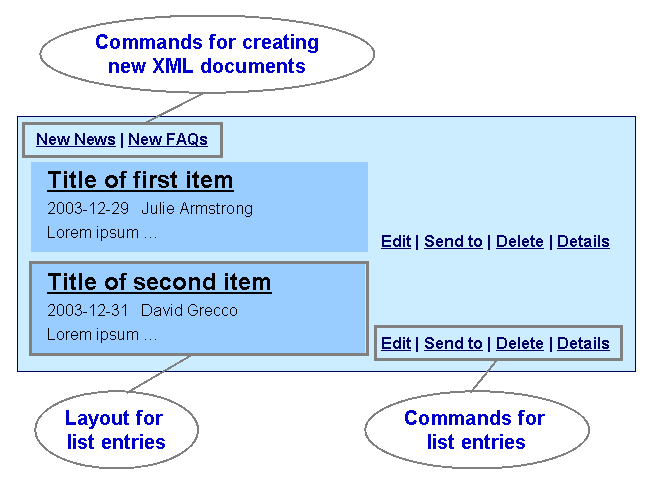
Commands for Lists
Procedure
Create a command group.
Choose
 System Administration
  System Configuration Knowledge Management Content Management User Interface Commands
UI Command Groups.
System Configuration Knowledge Management Content Management User Interface Commands
UI Command Groups. 
Duplicate one of the following command groups:
NewsGroup (for authors)
NewsDisplayGroup (for readers)
Add the commands that you want to display.
 Note
NoteThe interface command edit_xml_forms calls the Edit form that authors can use to change the news item in question.
End of the note.
Create a set of resource renderer settings.
- System Administration System Configuration Knowledge Management Content Management User Interface Settings
Resource Renderer Settings Resource Renderer Settings .
Duplicate one of the following sets of resource renderer settings:
NewsResourceRenderer (for authors)
NewsResourceDisplayRenderer (for readers)
In the Resource Command Group parameter, enter the command group that you created in step 1.
NoteEnter the NewsRenderer in the Resource Renderer parameter. This renderer is not only for news items - it is for all types of document created using XML forms.
End of the note.
Create a layout set.
Choose
System Administration System Configuration Knowledge Management Content Management User Interface Settings
Layout Set. Duplicate one of the following layout sets:
NewsExplorer (for authors)
NewsBrowser (for readers)
In the Resource Renderer parameter, enter the set of resource renderer settings that you created in step 2.
NoteMake sure that the CreateXMLFormsGroup command group is entered in the collection renderer settings of the layout set for authors in the Collection Command Group parameter. This command group displays commands for creating new XML documents dynamically.
End of the note.
Create an iView and use the layout set that you created in step 3.
For more information, see Creating iViews for Form-Based Publishing.