 Displaying Statistics for Coordinators
Coordinators can check the overall status of a project by displaying translation statistics for one or more target languages.
Prerequisites
A translation evaluation must have run at least once for statistics to be created.
You know the worklist number of your translation project.
Procedure
Call transaction SLLS.
Check the most recent generation date of the statistics.
Go to the Options tab page to select the translation data (collections, object types, domains) you want to display translation statistics for. For more information, see Configuring the Display of Statistics.
Go to the History tab page to select a list of statistics for a specific time period to track how the workload for your translation project is progressing.
Proceed as shown in the graphic below. For more information, see Working with the Statistics History.
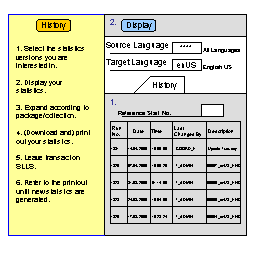
History Tab Page
Go to the All Languages tab page to view a summary of the statistics for a selection of languages.
Proceed as shown in the graphic below. For more information, see Displaying Statistics for Multiple Languages.

All Languages Tab Page
Transaction SLLS can be performance intensive. Even if you are not working in SLLS, having a session of SLLS open can unnecessarily consume memory on the database.
Result
The system displays statistics data according to the criteria you selected.