 General Configuration Steps
You must make certain settings before you can execute the demo examples. There are general cross-scenario settings and scenario-specific settings.
This section gives you an overview of all the general cross-scenario settings.
 Note
Note
For a detailed introduction to the configuration of the demo examples, see the document SAP Enhancement Package 1 for SAP NetWeaver PI 7.3 - Demo Examples Configuration available in SAP Developer Network (SDN) at http://scn.sap.com/docs/DOC-27364.
There is an overview of the scenario-specific settings for the individual process integration scenarios in the description of the process integration scenarios. For a detailed description of the scenario-specific settings, see the above guide.
Note
It is assumed that the installation and technical configuration of SAP NetWeaver Process Integration has been completed correctly.
Defining a System Landscape - SAP Standard Configuration
To use the demo examples, you need application systems for the travel agency and the airlines. These must be SAP systems based on SAP NetWeaver 7.3.
SAP has provided a standard configuration for the demo examples. This comprises the following application systems:
An application system for the travel agency (called TravelAgency) that uses the proxy runtime for communication
An application system for the airline Lufthansa (called Airline_LH) that also uses the proxy runtime for communication
An application system for the airline American Airlines (called Airline_AA) that either uses the proxy runtime or, if required, the RFC and IDoc runtime for communication
An application systems for the airlines United Airlines (called Airline_UA) and Singapore Airlines (called Airline_SQ) that serve as external partner and that make Web services available for communication
Technically speaking, these application systems can be different SAP systems, but it is simpler to use several clients of one SAP system.
 Caution
We recommend that you use the SAP standard configuration. Since the demo examples are only intended to demonstrate Process Integration and are not scenarios for productive use, SAP only provides support for the standard configuration.
Note
The detailed setting instructions in the configuration instructions for the demo examples assume that you are using the standard configuration.
In addition, you need an SAP system with SAP NetWeaver installed. This system contains the Integration Server and the Integration Builder.
The application systems TravelAgency, Airline_LH, Airline_AA, Airline_UA and Airline_SQ communicate using the Integration Server. This is illustrated in the following graphic:
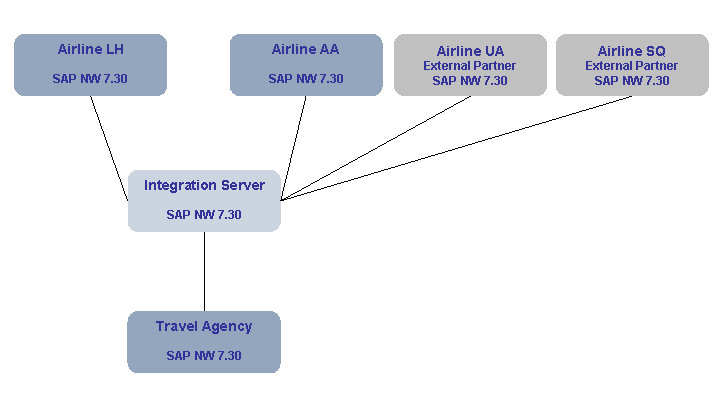
System Landscape for the Demo Examples
Connecting Application Systems to the Integration Server
To connect the application systems (for the travel agency and the airlines) to the central Integration Server and enable them to communicate, you must make all the relevant settings. This includes the following settings:
Configuring the local Integration Engines in the application systems
Defining the involved application systems as technical systems and business systems in the System Landscape Directory
Defining the three business systems as business system services in the Integration Directory. You must also generate and define the corresponding communication channels.
For more detailed information, see the general SAP XI configuration guide.
Application-Specific Settings
You must also make the following settings (specific to the flight booking example) in the application systems.
The demo examples require appropriate data in the flight data tables. You must generate this data in all the involved application systems.
A Business Server Page is available for the travel agency functions. You must activate this in the travel agency system.
For more detailed information (for the SAP standard configuration), see the configuration guide for the demo examples.