 BPM-SAP StreamWork Public APIs
Using the public APIs of the collaboration integration in BPM, it is possible to add collaboration functionality to the Task Management of BPM. If you are implementing your own task user interface (UI) based on the corresponding public APIs, you also have to implement the collaboration integration in the task UI. The documentation section describes how one can create a collaboration activity in the SAP StreamWork from within the Task Management and link it to a specific BPM Task instance.
Prerequisites
You have added a dependency to development component tc/bpem/collab_api (public part: api) in software component BPEM-COLLAB. Additionally, you know the ID of an existing task instance which you might have created using the BPM public api in BPEM-FACADE .
For more information about the BPM public api, see Working with the BPM APIs.
In the following description, the variable taskInstanceId of type URI refers to the id of the task instance.
Procedure
When you use the public API of the collaboration integration, all operations triggered on the collaboration platform (such as creating an Activity) will be triggered in the context of the user who is currently logged on. Therefore, the user mapping (BPM user to the user on the collaboration platform (for example, SAP StreamWork)) has to be defined once per user. This is referred to as a handshake and has to be done by the user himself. Once a user has completed the handshake, the user mapping will be automatically stored by the collaboration integration. In case of StreamWork, this will store and associate the OAuth access token to the currently logged user.
The following sequence diagram visualizes the process.
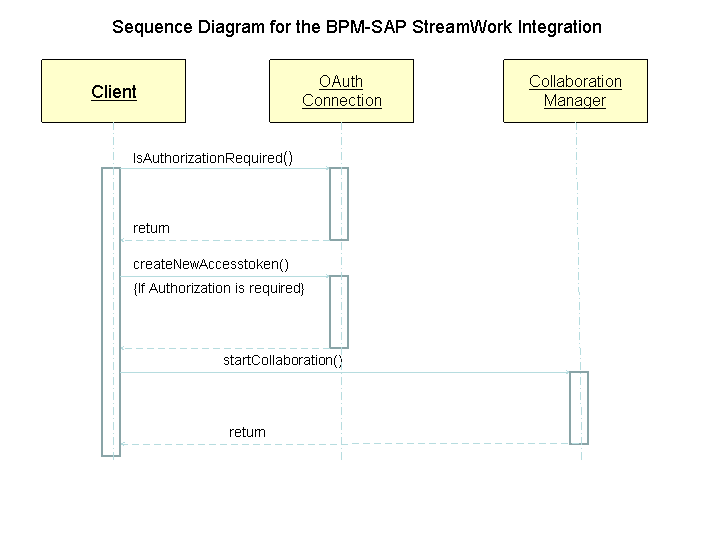
Whenever executing an operation on the collaboration platform, the user of the public API checks if the mapping has been defined and whether it is still valid. If this is not the case, the system delegates the user to initiate the handshake before calling the actual operation.
OAuth Handshake
The following procedure describes the handshake:
Retrieve an OAuth connection.
Get a OAuth connection which can be used to trigger the OAuth handshake with StreamWork. The connection will be initialized with the user who is currently logged on.
 Syntax
OAuthConnection oauthConnection = BPMCollabFactory.getInstance();
End of the code.Check if the handshake needs to be triggered.
As the handshake with the remote collaboration platform has to be done only once by a user, it must be possible to check this state. As described later on in the description, applications using the public API have to frequently check this in order to avoid displaying errors to the end user.
Syntaxboolean bAuthRequired = oauthConnection.isAuthorizationRequired()
End of the code.Trigger the handshake.
In case the user mapping has not been defined, the user of the public API has to trigger the authentication handshake with the remote collaboration platform. This will request an OAuth access token and finally store it in the system. The implementation of the interface
OAuthSignupDataneeds to be provided by the application using the public API. It acts as a callback in the handshake workflow.Application using the API calls method
createNewAccessToken().Method
forward(URL)of the passed instance ofAuthSignupDatais called to ask the client application to delegate the user to a specific URL on the collaboration platform (for example, for SAP StreamWork, the user has to grant permission to BPM to make remote calls to the collaboration platform).User is forwarded to the URL.
User grants permission.
SAP StreamWork creates access token and sends it back to the collaboration integration component.
Method
getApplicationUrl()is called to get the application-specific URL the user should be forwarded to once the handshake is completed.User is forwarded to the application specific URL and can continue working
OAuthSignupData signupData =...; oauthConnection.createNewAccessToken(signupData);
Calling SAP StreamWork Operations
Once the handshake has been completed, an application can use the APIs to perform operations on the collaboration platform. The following procedure describes how to perform the operations required by a custom task UI:
Retrieve the Collaboration Manager.
SyntaxCollaborationManager collabManager = BPMCollabFactory.getInstance();
End of the code.Retrieve the title of the task instance.
As the activity is created in the context of a task instance, some additional data of the task is read to use it in the upcoming steps
SyntaxTaskInstanceManager taskInstanceManager = BPMFactory.getTaskInstanceManager(); TaskDetail taskDetail = taskInstanceManager.getTaskDetail(taskInstanceId);
End of the code.Start the collaboration.
Start the collaboration on a specific task instance by creating an activity and linking this to the task instance. The activity will be created using the title of the task instance. The returned instance of class CollaborationActivity will serve as a handle to the activity in subsequent calls to the CollaborationManager. Before triggering the action, the system checks that the user mapping is valid. Only in this case is the method
startCollaborationcalled. Otherwise, the handshake has to be triggered again for the currently logged-on user as described above. Syntaxif(oauthConnection.isAuthorizationRequired()) CollaborationActivity activity = collabManager.startCollaboration(taskId, taskDetail.getName(), "Description text for collaboration activity.");
End of the code.Invite additional users.
Once the activity has been created, you can invite additional users to it. In this case, users are identified by their e-mail addresses.
Syntax<String> userIds = new ArrayList<String>(); userIds.add("user@company.com"); if(oauthConnection.isAuthorizationRequired()) collabManager.inviteParticipants(activity, userIds);
End of the code.Upload content.
It is possible to populate the activity with content that allows participants to begin the collaboration. If you want to share a document with the activity participants, you can do so by uploading it to the activity in SAP StreamWork. Only participants who have been invited to the activity are allowed to see the document.
SyntaxString fileName = ...; String fileDescription = ...; InputStream is = ...; long fileLength = ...; String fileType = ..."; if(oauthConnection.isAuthorizationRequired()) collabManager.uploadAttachment(activity, fileName, fileDescription, is, fileLength, fileType);
End of the code.Similarly, it is possible to upload text as a string.
SyntaxString textName = ...; String textContent = ...; if(oauthConnection.isAuthorizationRequired()) collabManager.uploadText(activity, textName, textContent);
End of the code.Retrieve a link pointing to the activity.
The link can be displayed in a UI to allow users to navigate to the activity in SAP StreamWork.
SyntaxString activityUrl = collabManager.getPlatformLinkForActivity(activity);
End of the code.Get the latest details of the activity.
As the activity can be changed in SAP StreamWork independently of the task instance, it is possible to retrieve the latest information about the activity.
Syntaxif(oauthConnection.isAuthorizationRequired()) CollaborationActivity activity = collabManager.getCollaborationActivity(taskInstanceId);
End of the code.Close the activity.
If the task instance is closed, you probably want to close the attached activity as well.
Syntaxif(oauthConnection.isAuthorizationRequired()) collabManager.closeActivity(activity);
End of the code.Cancel the collaboration.
In order to interrupt the connection of the activity to a task instance, you have to cancel the collaboration. This will remove the link and optionally also delete the activity in SAP StreamWork. The following code will NOT delete the activity.
 Note
NoteAlthough the activity is still present in SAP StreamWork, subsequent calls to
#getCollaborationActivity(taskInstanceId)throw an exception.End of the note. Syntaxif(oauthConnection.isAuthorizationRequired()) collabManager.cancelTaskCollaboration(taskInstanceId, false);
End of the code.