 Update Dispatching with Load Balancing
Multiple update servers can provide update services in one SAP system. With multiple update servers the SAP system automatically distributes the update requests among the servers using a process known as “update dispatching”.
Update processing is triggered by a request from the dialog server in which an update was generated. This request is sent to a specific update server. So the dialog server decides which update server is to be used for a particular update.
The basis for load-balancing is a list of the available update servers. This list is held on every application server and is updated automatically by the message server whenever any server starts, stops, or changes its configuration through a switch to a new operation mode. You can display this list (Display Update Servers).
If more than one update server is eligible to process one update record, the dialog server uses a load-balancing algorithm to select which update server will process the record.
This load-balancing algorithm allocates update records to update servers in round-robin fashion in cyclical repetition. A server sends an update request to each update server in turn. When the number or requests sent equals the number of update work processes at an update server, then the server is eliminated from the list until the start of the next cycle. Once all of the update work processes have been assigned update requests in this way in the SAP system, the cycle starts again and with all of the update servers.
If a V2 work process Upd2 has been defined, V2 update modules can only be processed by this work process. If there is no V2 work process, V2 updates are processed in the V1 update work processes. A V2 update component must however wait until all V1 update requests have been processed.
The following example illustrates the load distribution algorithm:
Example
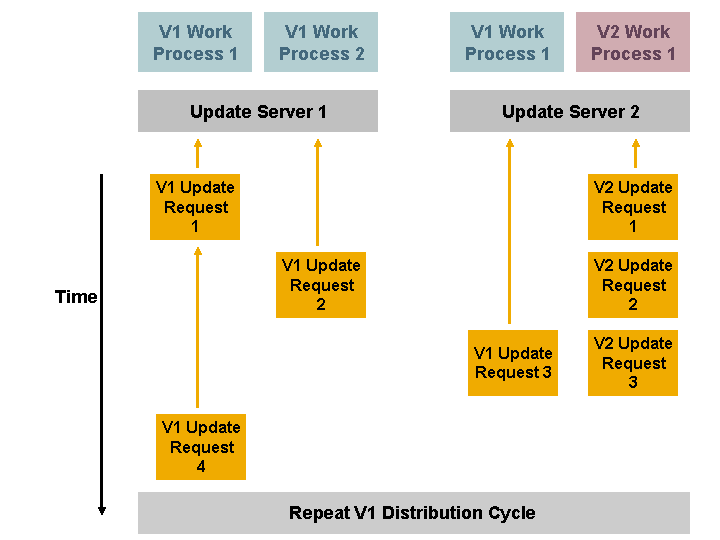
Two work processes run on update server 1 for V1 update modules. Update server 2 has one V1 update work process and one V2 update work process. A load-balancing cycle for V1 updates therefore consists of three update requests. These requests are distributed as follows:
The first and second update requests are sent to update server 1. (Number of requests = Number of V1 update work processes * parameter rdisp/vb_factor (default value 1)). If an update server is noticeably faster and should therefore receive more update requests, it is useful to set the parameter to a value other than 1.
The update system chooses update server 2 for the third request. The load distribution cycle is then complete (number of assigned updates = number of update work processes).
The cycle repeats, and U1 update request 4 is sent to Update Server 1 again.
V2 updates are processed according to sequence from the V2 work process.
Reassignment When an Update Server Fails
If an update server fails for some reason, then the other update servers in the system take over and process any updates that the failed server did not process.
If an update server is shut down, for example, the SAP message server establishes that the server is not available on the basis of an error message regarding the missing server connection or on account of the connection checks, which are carried out at regular intervals.
Once the message server determines that the update server is no longer present, it updates its list of application servers and their services and re-distributes the list to the other application servers.
The first update server on the list automatically takes on the task of redistributing the update requests of the failed server according to the dynamic update assignment criteria described above.