
 Layout Profiles

Use
You can assign a special layout profile to folders. This gives a folder its own layout. If you navigate to this folder in the folder hierarchy, the layout changes within the iView.
Integration
● A layout profile references a layout set.
● The default layout profile references a single layout profile.
Users can select a layout profile in the settings for a folder. There is an overview of available layout profiles in the Details dialog boxes of folders at Settings →Presentation. If specified, a thumbnail view is displayed for the layout profile.
The graphic below shows the structure of the selection window for layout profiles:
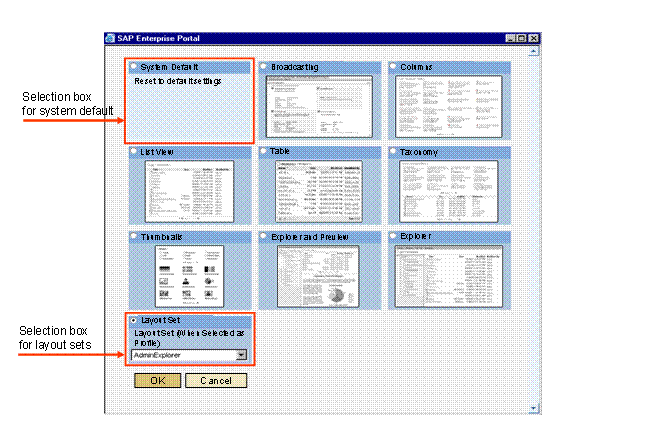
As well as the
overview of available layout profiles, the selection window contains a
selection box for the system default and a selection box for layout sets. The
selection box for the system default is used to activate the default layout
profile or the default settings for the folder. The selection box for layout
sets allows administrators or users with the service permission Layout
to select a layout set from a list. For more information, see
 Defining the Display
of Folders.
Defining the Display
of Folders.
Features
The following parameters denote a layout profile:
Layout Profile Parameters
Parameters |
Required |
Description |
Name |
Yes |
Name of the layout profile. |
Description |
No |
Description of the layout profile. |
Bundle File |
No |
The bundle file that contains the key and values for the layout profile. |
Thumbnail Path |
No |
Path to the graphic to be displayed as a thumbnail view of the layout profile in the Details dialog box for a folder under Settings → Presentation. |
Layout Profile Plug-In |
No |
Plug-in to be used for the layout profile. The plug-ins allow you to configure the layout profile from the Details dialog box (see Plug-Ins for Layout Profiles). |
Layout Set |
Yes |
Specifies the layout set assigned to this layout profile. |
Enabled |
No |
If activated, the layout profile is displayed in the Details dialog box of a folder under Settings → Presentation → Select Profile… |
Users |
No |
Special users for whom the layout profile is to be displayed in the Details dialog box of a folder. If you enter no special users, all users can select this layout profile in the Details dialog box of a folder. |
Activities
Several layout profiles are contained in the standard delivery. For an overview of the layout profiles available in the system, see the configuration iView at Content Management → User Interface → Settings → Layout Profile. You can create a new layout profile or modify an existing one here.
The selection box for the system default and the selection box for layout sets are already pre-configured. No further configuration is necessary. To call up the configuration of both selection boxes, choose Content Management → User Interface → Settings → Selection Box for System Default or Selection Box for Layout Sets.
To call up the overview of available layout profiles including thumbnails in the Details dialog box for a folder, choose Settings → Presentation → Select Profile from the Details dialog box in question.

Note that you can only call up this overview from folders in which a command group with the Settings → Presentation entry is displayed in the Details dialog box.