7.5 Configuring Authentication on the Server 
Authentication Against an ABAP System
To access a Web application, AS ABAP uses the HTTP framework from Internet Communication Manager (ICF) that provides functions for defining the logon procedure. For more information, see Maintaining Logon Procedures.
A simple process is available for configuring the system logon. For more information, see System Logon (ICF system logon application). In addition, you can customize the logon information according to your needs, for example, system ID, client, language, system messages, logon, and system information. For more information, see Configuration Settings.
With this, authentication against an ABAP system reduces to the normal authentication process as is standard for all Web-based applications on an ABAP stack, for example, BSP and Web Dynpro ABAP.
Settings for the Configuration for SSL support are particularly important for security with AS ABAP. For more information, see Configuring the AS ABAP for Supporting SSL. The logon ticket cache function is provided for increasing performance when multiple logons exist.
More Information
Authentication Against a Portal System
NWBC uses the Ticket Issuer to log on to the J2EE server. The logon must be properly configured in the J2EE engine for this to work correctly.
Call the SAP NetWeaver Administrator.
Go to Configuration Management.
Choose Authentication.
Select component sap.com/tc~sec~sso~app*ticketissuer.
Enter the following as the assigned login modules:
Login Module Name
Flag
EvaluateTicketLoginModule
SUFFICIENT
ClientCertLoginModule
OPTIONAL
CreateTicketLoginModule
SUFFICIENT
BasicPasswordLoginModule
REQUISITE
CreateTicketLoginModule
OPTIONAL
This may appear as shown in the figure below:
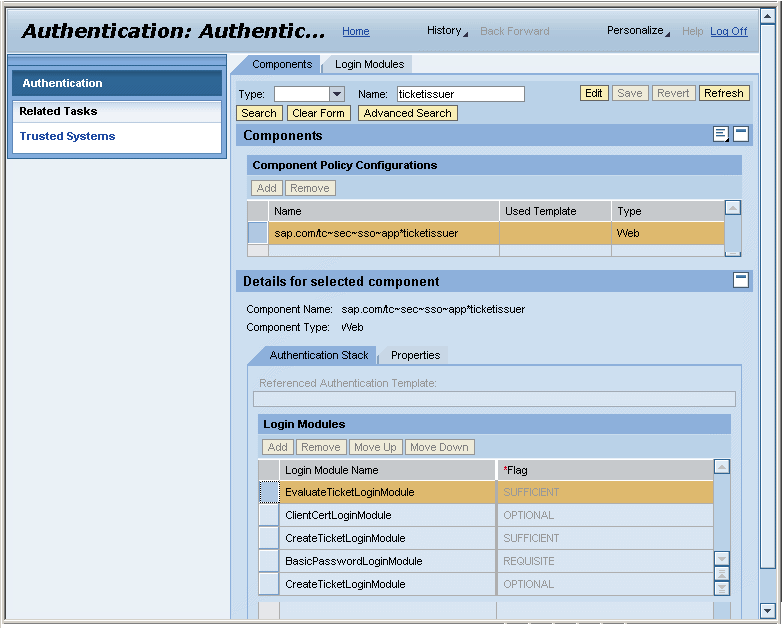 (Ticket Issuer)
More Information
SAP Library for SAP NetWeaver on SAP Help Portal at
 http://help.sap.com
  SAP NetWeaver 7.0 including Enhancement Package 2 English Administrator's Guide
SAP NetWeaver Security Guide Security Guides for SAP NetWeaver According to Usage Types Security Guides for Usage Types EPC and EP Portal Security Guide
SAP NetWeaver 7.0 including Enhancement Package 2 English Administrator's Guide
SAP NetWeaver Security Guide Security Guides for SAP NetWeaver According to Usage Types Security Guides for Usage Types EPC and EP Portal Security Guide 
SAP Library for SAP NetWeaver on SAP Help Portal at
http://help.sap.com SAP NetWeaver 7.0 including Enhancement Package 2 English Administrator's Guide
SAP NetWeaver Security Guide Security Guides for SAP NetWeaver According to Usage Types Security Guide for Usage Type AS SAP NetWeaver Application Server Java Security Guide SAP Library for SAP NetWeaver on SAP Help Portal at
http://help.sap.com SAP NetWeaver 7.0 including Enhancement Package 2 English SAP NetWeaver by Key Capability
Application Platform by Key Capability Java Technology Administration Manual AS Java Security SAP Library for SAP NetWeaver on SAP Help Portal at
http://help.sap.com SAP NetWeaver 7.0 including Enhancement Package 2 English SAP NetWeaver by Key Capability
Application Platform by Key Capability Java Technology Administration Manual AS Java Security Transport Layer Security on the SAP J2EE Engine Configuring
the Use of SSL on the J2EE Engine