Input Help for Defining
Parameters
Input Help for Defining
Parameters

Purpose
The system provides you with an input help for defining parameters in SAP Event Management (SAP EM). This gives you a quicker overview of the application system (AS) parameters that you can use for defining parameters in SAP EM.
Prerequisites
You have completed the following on the application side:
· Defined the logical system
· Specified the application objects that are relevant to supply chain event management (SCEM-relevant)
· Specified Maintenance mode for the business process type for your SCEM-relevant application objects
· Assigned function modules to extractors in Customizing for the application system
· Assigned the extractors to application object types in Customizing for the application system
· Specified the corresponding SAP EM(s) for the application system
· Specified the parameters in SAP EM
Process Flow
...
...
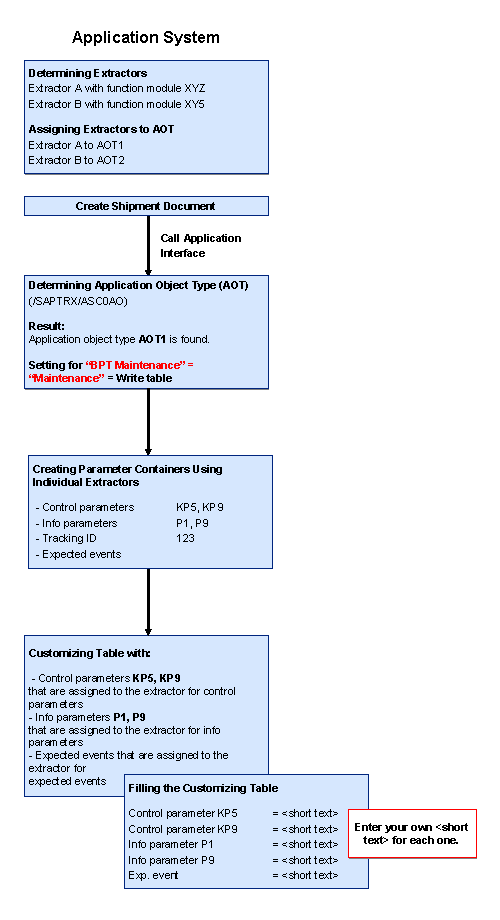
1. The process begins when you create or change a document (application object of a specific application object type) in the application system.

For example, you have completed the following in Customizing for the application system:
· Specified extractor A for creating the info parameter list. You assign extractor A to function module XYZ.
· Assigned extractor A to the application object type AOT1.
· Created a shipment document SHD that belongs to application object type AOT1.
The application system creates an application object AO1 for application object type AOT1.
2. The application system determines the application object types.

If you have set the mode of the business process type for your SCEM-relevant application objects to Active, the system continues to extract application data from the application system and transfer it to SAP EM.
The application system automatically creates a parameter list. The system stores the parameter list in a Customizing table. SAP EM displays the parameter list to you as an input help when you define parameter mapping. You can specify a description for the parameters.
For example, the system creates an info parameter list with the AS info parameters P1 and P9 for application object AO1. You specify a description for the info parameters.
The following figure shows you the simplified automatic creation of the input help. You can also create the input help manually in the transaction for defining SAP EM interface functions (/SAPTRX/ASC0TF).
Simple Example Use for the Input Help
...
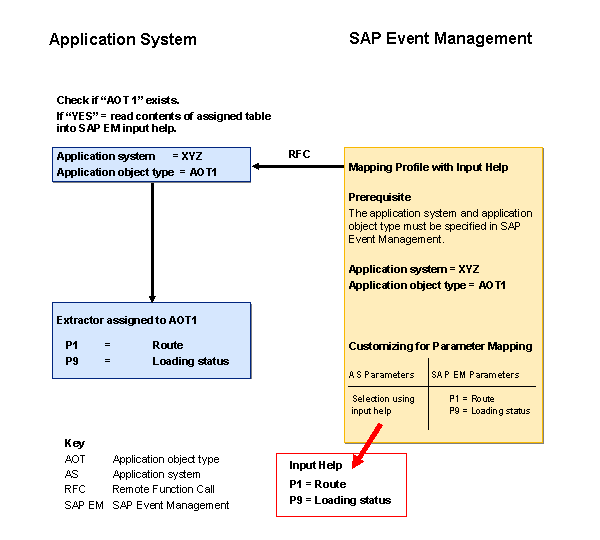
1. You want to create a parameter mapping profile (transaction /SAPTRX/TSC0PDM) and want to use the input help for entering application system info parameters to do this.
2. This info parameter mapping profile is to be valid for application system XYZ and application object type AOT1.
3. You have SAP EM display the input help for the info parameters. To do this, SAP EM asks the application system for the input help belonging to application object type AOT1.
4. The application system checks whether or not application object type AOT1 exists:
¡ If it does exist, the application system transfers the input help to SAP EM.
SAP EM displays the input help for entering application system info parameters.
¡ If it does not exist, the application system does not transfer an input help to SAP EM.
SAP EM does not display an input help for entering application system info parameters.
The following figure shows you a simplified overview of using the input help: