 Examples of Generated Wf-XML Documents
This example is based on the following scenario. The Workflow WS00000000 runs in SAP System A, starts workflow WS99999999 in SAP System B and waits for feedback. The text test WebFlow is written into the import parameter Question for the workflow to be started. Once workflow WS99999999 is successfully executed, the export parameter Answer contains the text test successful. Both SAP Systems have a release status from 6.10.
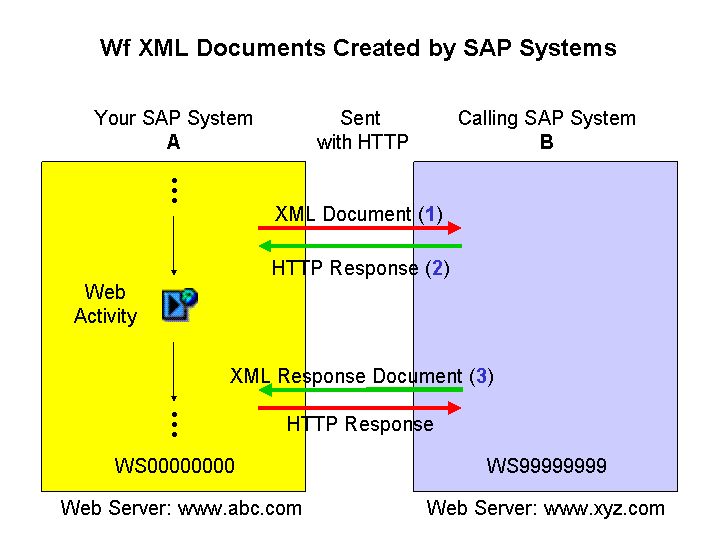
The following XML documents are created by the system.
1. XML document to start workflow.
 Syntax
<?xml version="1.0" ?>
<WfMessage Version="SAP.1.0">
<WfMessageHeader>
<Request>
<ResponseRequired>Yes</ResponseRequired>
</Request>
<Key>HTTP://www.xyz.com/SAP/BC/WORKFLOW_XML/?~protocol=01&~localkey=WS99999999</Key>
<Operation>CreateProcessInstance</Operation>
</WfMessageHeader>
<WfMessageBody>
<CreateProcessInstance>
<Key>HTTP://www.xyz.com/SAP/BC/WORKFLOW_XML/?~protocol=01&~localkey=WS999999999</Key>
<ObserverKey>http://www.abc.com/SAP/BC/WORKFLOW_XML/?~protocol=01&~localkey=000000111669</ObserverKey>
<ContextData>
<QUESTION>test WebFlow<QUESTION>/
</ContextData>
<StartImmediately>Yes</StartImmediately>
</CreateProcessInstance>
</WfMessageBody>
</WfMessage
End of the code.
2. HTTP reply as XML document when workflow is WS99999999 started
Syntax
<?xml version="1.0" ?>
<WfMessage Version="SAP.1.0">
<WfMessageHeader>
<Response />
<Key>HTTP://www.xyz.com/SAP/BC/WORKFLOW_XML/?~protocol=01&~localkey=WS99999999</Key>
<Operation>CreateProcessInstance</Operation>
</WfMessageHeader>
<WfMessageBody>
<CreateProcessInstance>
<ProcessInstanceKey>000000112606</ProcessInstanceKey>
</CreateProcessInstance>
</WfMessageBody>
</WfMessage>
End of the code.
3. XML reply document after completion of workflow WS99999999
Syntax
<?xml version="1.0" encoding="utf-8" ?>
<WfMessage Version="1.0" xmlns="http://www.wfmc.org/standards/docs/Wf-XML">
<WfMessageHeader>
<Request ResponseRequired="Yes" />
<Key>HTTP://www.xyz.com/SAP/BC/WORKFLOW_XML/?~protocol=01&~localkey=000000112606</Key>
</WfMessageHeader>
<WfMessageBody>
<ProcessInstanceStateChanged.Request>
<ProcessInstanceKey>HTTP://www.xyz.com/SAP/BC/WORKFLOW_XML/?~protocol=01&~localkey=00000112610</ProcessInstanceKey>
<State>
<closed.completed />
</State>
<ResultData>
<ANSWER>Test successful</ANSWER>
</ResultData>
</ProcessInstanceStateChanged.Request>
</WfMessageBody>
</WfMessage>
End of the code.