 Using Linkages
A linkage defines the assignment of events to the event receivers interested in them.
The potential receiver of an event must define the linkage. This can be done using function modules provided or a maintenance transaction.
Type linkages and instance linkages are used within Business Workflow. Workflows and tasks can be started when a particular event occurs using type linkages, and work items can be continued using instance linkages.
 Caution
It is only necessary to maintain linkages manually if you use events within your own separate developments. If events are used exclusively within the SAP Business Workflow environment, all the definitions required are carried out by the workflow system.
Features
The workflow system in the form of the event manager evaluates all the events created. In doing this, the event manager carries out the following steps:
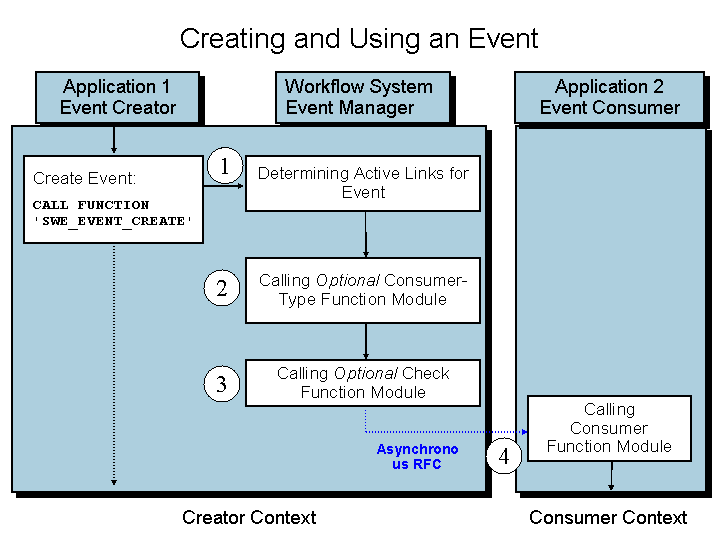
The event manager checks all the active linkages and determines the linkages that are relevant for the event created.
If a receiver type function module is entered, it is called to determine the receiver type.
 Note
NoteLinkages that are evaluated by Business Workflow must have the entry WORKITEM or EVENTITEM or a workflow/task ID as receiver type.
End of the note.If a check function module is entered it is called. If its execution terminates with an exception, the linkage is not executed.
The receiver function module is called with the parameters event, receiver type, and event container.
NoteFor more information on using these function modules, see Function Modules for Processing Events.
End of the note.
If the event manager does not find any relevant linkages, the event has not effect. Events are not buffered so that they can be delivered at a later date.
Note
It is, however, possible to temporarily store a receiver to be started due to an event in the event queue. Only those receivers whose linkages were active when the event was generated can be stored. For more information, see Administration of Event Queue.
The linkage between the creator and the receiver can be activated and deactivated at definition time and even at runtime for a specific situation or customer using an indicator.
Activities
For an overview of the type linkages that are defined, choose  Tools
Tools  Business Development Event Type Linkages
  . For an overview of the instance linkages that are defined, choose Tools Business Workflow Development Administration Event Manager Instance Linkages .
For more information on the linkages used in SAP Business Workflow, see