 Monitoring the Storage of Print Lists
The procedure for storing print lists is shown schematically in the following diagram:
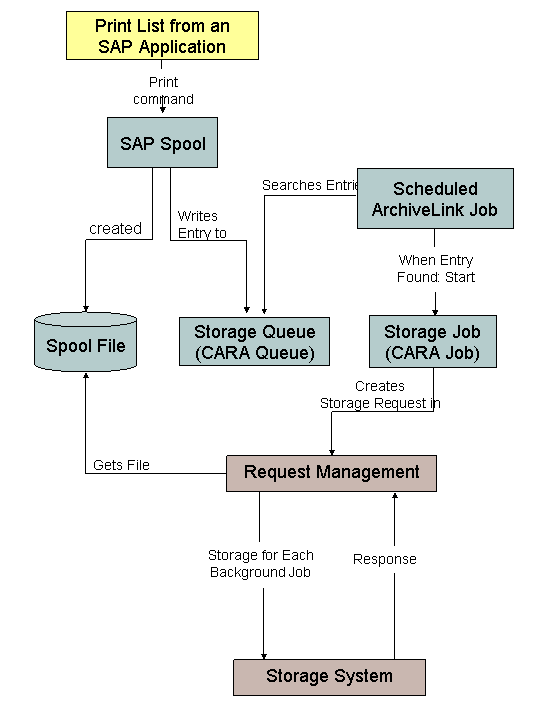
The following text describes all settings and monitoring options.
Settings for storing print lists
You can use  to change between modes:
Request management
Active: (standard setting): Request management is active in a new monitor.
Inactive: Request management is active in an old monitor.
 Note
NoteThe monitor has been changed for Release 6.10. You can still go to the old monitor using the pushbutton Old Monitor. You are recommended to use the new monitor.
End of the note.Delete
Automatic (standard setting): After successfully storing the print list, the storage request is automatically deleted in request management.
Manual: After successfully storing the print list, the storage request remains in request management until you delete it manually.
Storage Requests
Multiple Step Mode (standard setting): The steps of the storage request follow on automatically.
Single Step Mode: Each step of the storage request is only executed if it is manually triggered.
Confirmations
Multiple Step Mode (standard setting): The steps of the confirmations run automatically after each other.
Single Step Mode: Each step of the confirmation is only executed if it is manually triggered.
Storing Print Lists
 Storage queue
The CARA queue screen is displayed. The CARA queue is the queue in which the spool writes storage requests for print lists.
By choosing
 you manually start the execution of the storage requests waiting in the queue.
 - ArchiveLinkjob
The job overview of the ArchiveLink job is displayed, that you scheduled in customizing. The ArchiveLink job searches the CARA queue for entries.
- Storage job
The screen for the storage job is displayed. Whenever the ArchiveLink job finds an entry in the CARA queue, it starts the storage job (CARA job), which then creates the storage request in request management.
- Storage Requests
A list is displayed containing all current storage requests. Choose
 to display a list containing only the failed storage requests.
 From the list you can branch to the detailed view of a storage request. The request history is logged here. For more information, see Storage Requests: Detailed View.
- Confirmation
After storing, the storage system returns a confirmation to the SAP System. A list is displayed containing all the current confirmations. Choosing
displays a list containing only storage requests for which unsuccessful storage was confirmed.
Printing stored lists
Print job
Print lists can be printed from an entry in the detail screen of the hit list. A print job is started for printing, and a list of all current print jobs is displayed.