 Several Elements in a Single Line
To position a set of parameters or comments in a single line on the selection screen, you must declare the elements in a block enclosed by the following two statements:
 Syntax
SELECTION-SCREEN BEGIN OF LINE.
...
SELECTION-SCREEN END OF LINE.
Note that the selection text is not displayed when you use this option. To describe the elements, you must use the COMMENT addition of the SELECTION-SCREEN statement.
In the pos(len) formatting option of the SELECTION-SCREEN statement, you can omit pos between the statements specified above. The element is placed at the current position in the line. Between the statements specified above, you must not use a slash (/) in the pos(len) formatting option.
To determine the POSITION of an element in a line, you use:
SELECTION-SCREEN POSITION pos.
For pos, you can specify a number or one of the expressions pos_low or pos_high. pos_low and pos_high identify the positions of the two input fields of a selection criterion. Use the POSITION addition only between BEGIN OF LINE and END OF LINE.
Example
Syntax
REPORT demo_sel_screen_beg_of_line_1 .
SELECTION-SCREEN BEGIN OF LINE.
SELECTION-SCREEN COMMENT 1(10) text-001.
PARAMETERS: p1(3) TYPE c, p2(5) TYPE c, p3(1) TYPE c.
SELECTION-SCREEN END OF LINE.
The following selection screen appears:
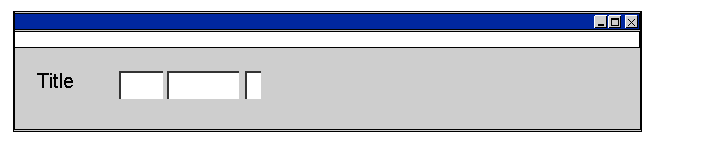
The line starts with the 'Title' contents of text symbol 001 and is followed by the input fields for parameters p1, p2 and p3.
Syntax
REPORT demo_sel_screen_beg_of_line_2 .
DATA wa_spfli TYPE spfli.
SELECT-OPTIONS airline FOR wa_spfli-carrid.
SELECTION-SCREEN BEGIN OF LINE.
SELECTION-SCREEN POSITION pos_high.
PARAMETERS field(5) TYPE c.
SELECTION-SCREEN END OF LINE.
The following selection screen appears:
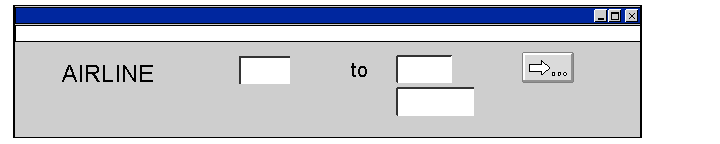
The input field for the field parameter appears below the second field of selection criterion airline. No selection text is displayed for field.