 Upgrade (AS ABAP)
This section describes SAP software upgrades for SAP NetWeaver Application Server (AS) ABAP. An upgrade updates an existing SAP system to a new release. The upgrade contains program code and data changes or introduces new areas of functionality.
Integration
SAP administrators must normally deal not only with new releases of SAP software but also with upgrades to the operating system (OS) and database management system (DBMS). However, we do not discuss OS and DBMS upgrades here.
An upgrade has to take into account the data in the customer system and other dependencies on external resources. A full upgrade consists of the following:
Operating system upgrade
Database upgrade
SAP system upgrade
The interaction of these areas makes upgrading an SAP system a complex task.
Prerequisites
SAP aims to reduce the downtime during an upgrade, which depends on the:
Hardware you are using – this is the most important factor
Release from which you are upgrading and the release to which you are upgrading
Database type and size
Applications used
Preconfiguration mode
Productive applications
Number of clients
Installed languages
Modifications
Number of Support Packages included
You can perform some of the preparations and post-upgrade activities while the SAP system is online, so reducing downtime.
Features
All upgrades to SAP Web AS 6.10 and higher use the System Switch method, which greatly reduces downtime compared to previous methods.
 Caution
For more information on preconfiguration modes, you must read the current SAP upgrade documentation before performing an upgrade. For more information, see
http://service.sap.com/upgrade
The following summarizes the preconfiguration modes:
Standard / high resource use
Shadow system and production system can run in parallel. Certain actions can be performed during uptime which reduces downtime considerably.
Low resource use
Operation of production and shadow system is only possible independently of each other. Production operation stops before the import of the substitution set into the shadow tables or, at the latest, before the shadow instance starts for the first time.
 Note
Note
On IBM DB2 for z/OS, database actions occurring during the upgrade are saved by database mechanisms. Therefore, logging is always on regardless of the preconfiguration mode. This lets you recover the database to the current status during the entire upgrade.
Starting with the upgrade to 4.6B, the application instance can run on z/OS, so that the overhead of network transmission is reduced. For more information, see the z/OS upgrade documentation.
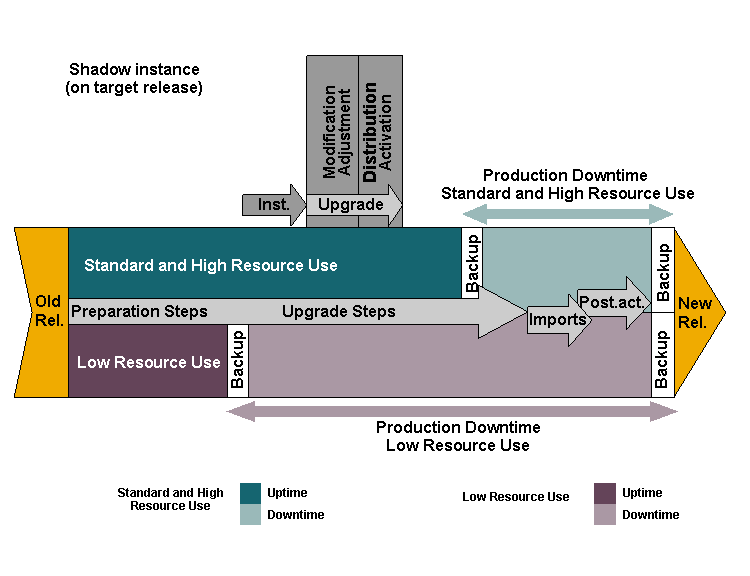
Processing Sequence with Preconfiguration Modes for System Switch
Activities
We recommend the following measures to reduce downtime during an upgrade:
Start upgrade preparations early
Identify modifications early (preparation roadmap steps)
Plan modification adjustment
Use the Modification Assistant
Choose the right preconfiguration mode
Use incremental table conversion (ICNV)
These measures are explained in more detail below:
 Recommendation
Rehearse the upgrade in an appropriate test system.
Whichever upgrade you are performing, the best recommendation of all is to rehearse it using a test system. This means that you use either a copy of your production system or a separately created and maintained development system with a representative set of application data. The test system ought to have the same release and extent of modifications as the production system. This also gives you the advantage outlined in the next recommendation.
Recommendation
Automatic incorporation of customizations from test system
A customers with test systems that can be used to stage upgrades prior to upgrading the production system has the benefit that all customizations performed on the test system can be automatically imported into the production system.
Recommendation
Plan the upgrade carefully.
Whichever upgrade you are performing, take the time to plan it carefully. This can be a laborious process but it helps to anticipate problems and avoid unplanned downtime. A full rehearsal with a system copy of the production system generates a detailed upgrade script, containing each single step as well as a timeline. This helps you to monitor your production system upgrade process and check whether it is still within the schedule.
Recommendation
Make use of the information from the preparation roadmap steps.
From the preparation roadmap steps, you can get precise information to help you with the modification adjustment using the transactions SPDD and SPAU. They also provide information to help you reduce the number of conversion errors due to lack of disk space during an upgrade.
Recommendation
Accept automatic modification adjustment for SAP objects in your live system.
When you upgrade your live or quality assurance system, you can accept modification adjustments that have been made in your development system and that are available as a modification adjustment transport request. This assumes that the development system is equivalent to your live or quality assurance system. It avoids the manual effort of performing this process with transactions SPDD and SPAU.
Recommendation
Use preconfiguration mode high resource use for shortest possible downtime.
Recommendation
Create a database backup after upgrade.
Always create a complete backup immediately after a successful upgrade if transaction logging has been turned off during the upgrade.
Otherwise – that is, if transaction logging has not been turned off – an online backup is acceptable after an upgrade.
Recommendation
Consider using striped disks.
Using striped disks can reduce the bottleneck problem caused by multiple importers competing for I/O resources. Note that this is a general approach to solving I/O bottleneck problems and is not specific to the SAP system.
Recommendation
Consider using incremental table conversion.
You can reduce downtime during the upgrade by performing table conversions incrementally, that is, during production operation and before you start the upgrade. For more information, see Incremental Table Conversion (AS ABAP).
Recommendation
Choose host names correctly if you use switchover software.
If you use switchover software, see SAP Note 96317, which describes problems with host names.