 Social Media Integration
Social Media integration provides collaboration in business processes with SAP Jam, the social collaboration platform from SAP. The integration gives you social capabilities where and when they are needed in business processes and keeps the connection to the working environment.
SAP Jam provides social collaboration tools to help you drive results wherever you work. With it, you can add structure to conversations and work to quickly drive actions, make decisions, or solve critical business issues. The integration connects transactional work with collaborative tasks, such as (pre-)planning, decision making or problem solving, which up to now are carried out independently via e-mail or document exchange. In collaborative business applications, you can discuss business transactions and exchange business data with internal or external users in a secure environment designed for collaborative needs.
A business process with integrated social collaboration can be processed as follows:
Clarification or more information is needed in a business process, for example missing input during master data maintenance
Collaboration will be initiated, to clarify questions, or to solve an issue in an SAP Jam group
Find the right people to help and expose the context for collaboration with all of the necessary information
During collaboration, the application sends status updates to SAP Jam or SAP Jam notifications are sent to application system (via subscription)
Collaboration can take place from within the application system or with the SAP Jam web interface, for example, to include external participants
Include the results of the collaboration in your business process
Proceed with your business process in the application system
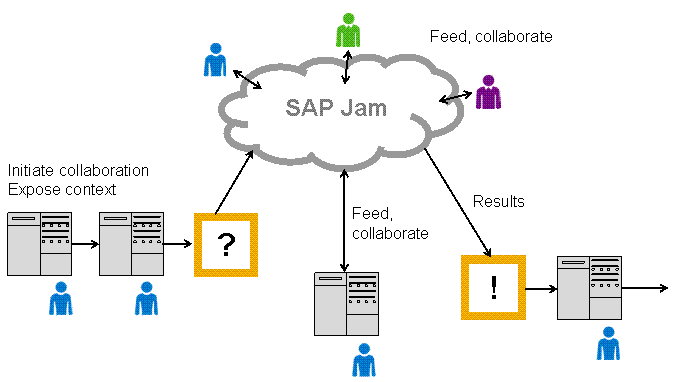
Business applications with integrated social collaboration
Implementation Considerations
The integration is based on the technology of the Social Media ABAP Integration Library (SAIL). SAIL is an API library with features providing the integration with SAP Jam. The features can be used by each SAP application in the ABAP environment. SAP offers different integration options with which you can start your own business collaboration project:
Social Media integration with SAIL is available in several SAP applications, for example:
SAP Customer Relationship Management (SAP CRM)
For more information, see SAP Library for SAP CRM on SAP Help Portal at
 http://help.sap.com/crm702
  Application Help
  . In SAP
CRM Library, choose Business Functions for SAP Customer Relationship Management Basic Functions and Performance Integration of SAP Jam with SAP CRM .
. In SAP
CRM Library, choose Business Functions for SAP Customer Relationship Management Basic Functions and Performance Integration of SAP Jam with SAP CRM .SAP Supplier Lifecycle Management (SAP SLC)
For more information, see SAP Library for SAP Supplier Lifecycle Management on SAP Help Portal at
http://help.sap.com/slc113 Application Help
. In SAP Supplier Lifecycle Management Library, choose Technical Concepts Business Functions SLC, Integration with SAP StreamWork (to use in compatibility mode with
SAP Jam).SAP ERP Human Capital Management (SAP ERP HCM)
For more information, see SAP Library for SAP ERP under
SAP ERP Central Component Human Resources Personnel Management (PA)
Personnel & Organization Landing Page Creating the Landing Page .
Social Media integration is also available with the Collaboration CHIPs in Side Panel for Business Suite and can be added to each SAP Business Suite application.
For more information, see SAP ERP library under
SAP ERP Cross-Application
Functions Cross-Application Components Side Panel for Business Suite .
To use social media integration, note the following prerequisites:
Depending on the release of your application, you have installed one of the necessary SAP NetWeaver releases to use the integration. For more information about the SAP NetWeaver releases in which SAIL is available, see the SAP Jam ABAP Integration - Configuration Guide on SAP Community Network at
http://scn.sap.com Solutions . On the Technology tab, choose Content and Collaboration SAP Social Software .
On the Content tab, choose the configuration guide from the list.
You have activated the Business Function Enable Social Media ABAP Integration 3. For more information, see SAP ERP library under Cross-Application Components Business Functions Business Functions in SAP
NetWeaver Enable Social Media ABAP Integration 3
You need access to SAP Jam as SAP Jam integrations with SAP applications require the SAP Jam Enterprise Edition. For more information, contact your account executive.
 Note
Note
Note SAP Jam is the successor platform to SAP StreamWork, you can continue to use SAIL with the new SAP Jam platform. Those applications that already provide the Social Media ABAP Integration with SAP StreamWork will also run with SAP Jam as the platform.
Features
The social media integration provides the following features:
Set of easy-to-use application programming interfaces (APIs) based on ABAP Objects
Implicit authentication (for SAP Jam the authentication is based on OAuth 1.0a with SAML2 bearer token)
ABAP Integration with SAP Jam: Each SAP application can use the APIs of the Social Media ABAP Integration Library (SAIL) for SAP Jam.
Compatibility mode for integrating with SAP StreamWork and SAP Jam as the platform: API methods that were originally developed for SAP StreamWork are compatible with SAP Jam. You have only to adapt Customizing. For more information, see the SAP Jam ABAP Integration - Configuration Guide.
Gateway notifications: You can send SAP NetWeaver Gateway notifications to a collaboration platform, as SAP Jam also works as a feed aggregator. Configure which OData service notifications will be sent in the additional Customizing.
User Mapping: SAIL needs an e-mail address to link user names (SAP user) from the back end to SAP Jam. With a Business Add-In (BAdI), you can define the mapping between the back-end user name and the e-mail address (and vice versa).
At several extension points, you can add application-specific developments via the Business Add-Ins (BAdIs) provided in Customizing for Collaboration.
For more information about these features, see SAP Jam ABAP Integration - Configuration Guide and SAIL - Programming Guide on SAP Community Network at http://scn.sap.com Solutions
. On the Technology tab, choose Content and Collaboration SAP Social Software . On the Content tab, choose the guides in the list.
More Information
For more information about Gateway notifications, see SAP Library for SAP NetWeaver Gateway on SAP Help Portal at
http://help.sap.com/nwgateway Application Help . In SAP NetWeaver Gateway Library,
choose SAP NetWeaver Gateway Developer Guide OData Channel . Then choose the following paths:- Advanced Features Subscription and Notification Flow Subscription and Notification Flow for Push Oriented Scenarios
- APIs and Coding OData Channel APIs OData Channel Push APIs
For more information about SAP Jam, see http://www.successfactors.com/jam.