 Understanding the Object Cycles (SCC) View in the Memory Inspector
Procedure
Use the Object Cycles (SCC) view to check your application for strongly connected components (SCCs).
An SCC is a set of ABAP class objects (in theory also anonymous data objects) that have the following characteristics:
For each object in the set, you can follow a path of one or more references to every other object in the set. Each object is linked by references to every other object in the set.
No component in the set is part of another SCC. In other words, two SCCs are always either identical or completely disjunct.
An example of an SCC is a doubly linked list. A pair of ABAP class objects that each has a reference attribute set to the object reference of the other is already an SCC.
SCCs are important in memory management because the ABAP Garbage Collector can only delete the objects in an SCC all together, as a unit. And the SCC can only be deleted if there is no reference from outside the SCC to any object in the SCC.
The presence of an SCC in your program is not in principle an error. An SCC becomes a problem if it unnecessarily keeps a large number of objects alive and thereby uses a lot of memory. A long-running application that caches many objects in a circular linked list or doubly-linked list could encounter memory problems because of its large SCC.
Note that you cannot compare memory snapshots in the Object Cycle (SCC) view. You can only analyze individual memory snapshots.
Analyzing a Strongly Connected Component
The display of an SCC will look something like this:
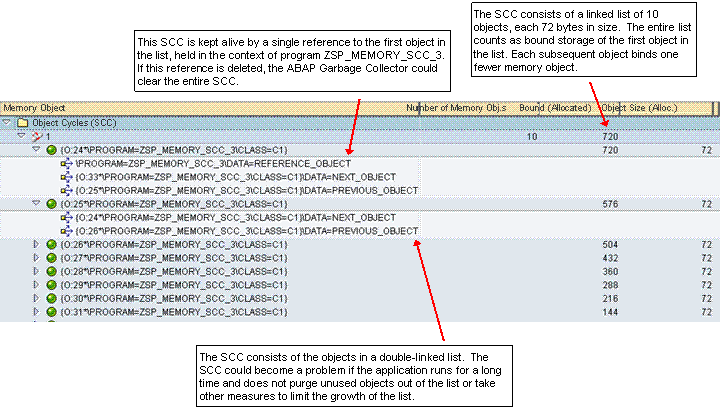
SCC: A Doubly-Linked List of ABAP Objects
The display lists each SCC found in the internal session separately. Here, the memory snapshot contains only one SCC. The SCC has been opened to show the objects within it, as well as the references to the first two ABAP class objects.
To see whether an SCC is causing a memory problem, check the following:
The number of objects in the SCC
The amount of storage bound by the SCC.
Ask yourself if the size of the SCC is reasonable.
Check the SCC in a memory snapshot taken later to see whether the SCC has grown or perhaps has been deleted and replaced by another SCC. If the SCC has grown, ask yourself whether there are mechanisms in place to limit the growth of the SCC. For example, are objects deleted from the SCC when they no longer are needed?
References: To understand the SCC, you must analyze the references that bind the objects together. In this case, it easy to see that the SCC objects are part of a doubly linked list. Each object has an attribute that references the previous and the next object in the list.
The SCC is kept alive by at least one reference to an object in the SCC from outside the SCC, in the top-level ABAP program. The first reference to the first object in the SCC is such an outside reference. The ABAP Garbage Collector can delete the objects in the SCC only if all such external references are deleted.
Bound memory calculation: The bound memory figures in the display reflect the hierarchy of objects in the doubly linked list. The allocated storage of all of the objects in the list counts as the bound storage of the first object. The next object in the list binds one less object and accounts for correspondingly less storage. The bound storage of the last object consists of only its own object size.
All of the objects in the SCC count toward the bound storage of the SCC as a whole. However, objects in the SCC can also refer to shared tables or strings or to objects outside the SCC which do not count as bound storage.
The Memory Inspector checks references to shared table bodies and strings in memory. If all such references come from objects within the SCC, then the shared memory object is counted toward the bound memory of the SCC as a whole. This feature of the Memory Inspector can lead to some confusing results in the calculation of the bound memory of the SCC as a whole.
 Example
Calculating the bound memory of the SCC as a whole: Class object A in an SCC has a variable that references an internal table. Class object B in the same SCC obtains a copy of the internal table — object B has its own reference to the internal table.
Since ABAP uses a copy-on-write strategy for copying value-semantic objects, a single copy of the table body in memory is shared by the two class objects.
In the Ranking List, the table would not count toward the bound storage of either class object. The objects share the table, so it would not be deleted if one of the class objects — A or B — were deleted.
However, the internal table does count toward the bound memory of the SCC as a whole. If the SCC is deleted, then both objects and both references to the internal table would be deleted.
The moral of the story: If the SCC shows a bound memory size that does not seem to make sense, then check the references to strings and tables held by the objects that belong to the SCC. The SCC objects share an internal table or string that counts toward the bound storage of the SCC as a whole. The confusing bound storage figure includes this memory object, even though it does not count toward the bound storage of any of the individual class objects.