 Setting Severity to Web Services and Web Service Clients
You set severity to increase or decrease the logging and tracing information of Web service clients. This procedure is optional and you can use it to preview system calls to the Converter Web service.
Procedure
Open the SAP NetWeaver Administrator in a web browser by entering the following address.
http://localhost:<port>/nwa
You can construct <port> by the formula 5 + NN + 00, where NN is the number of the Java instance.
Enter your user name and password if required.
Choose
 Problem Management
  Logs and Traces Log Configuration
  .
.Alternatively, you can use the quick link /log-config as follows:
http://<host>:<port>/nwa/log-config
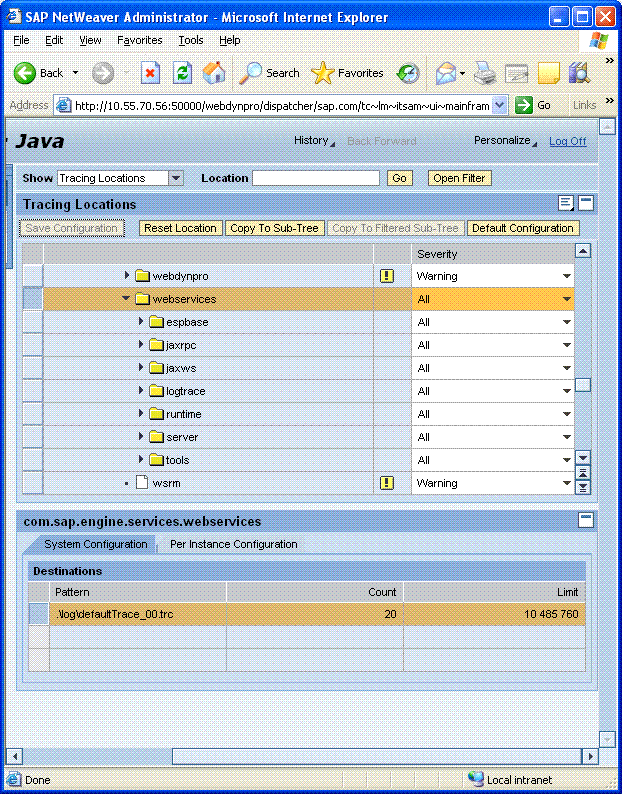
In the Show field, choose Tracing Locations, and then choose Go.
In the Tracing Locations table, choose
com sap engine services webservices .In the Severity field, choose All.
 Note
NoteIncreasing the severity level may impact the performance of the system. We recommend that you decrease severity after you complete the tutorial.
End of the note.Choose Copy To Sub-Tree.
Choose Save Configuration.
Result
The system logs all calls to the Web service.